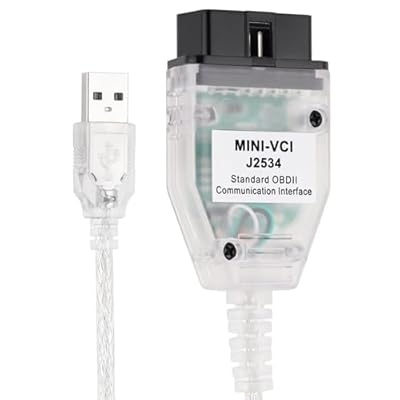
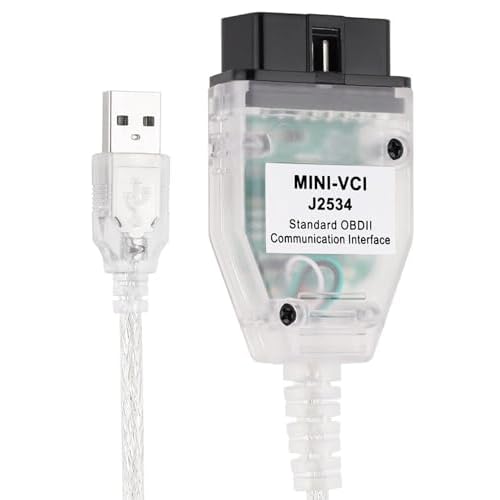
MINI VCI J2534 Cable Fit for Toyota TIS Techstream V14.20.019 Version, Car Diagnostic Tool OBD2 Firmware 1.4.1, Scanner Adapter Diagnostic Cable Scan
Ubuy works hard to protect your security and privacy. Our advanced payment security system ensures confidentiality by encrypting your information during transmission using AES (Advanced Encryption Standards) and SSL (Secure Socket Layer) protocols. Your payment details are 100% secure as we do not share your payment details with third party sellers.
User-friendly, multi-language diagnostic tool compatible with all Toyota cars since 1996.
Fast
Shipping
Free
Return*
Secure Packaging
100% Original Products
PCI DSS Compliance
ISO 27001 Certified

What Stands Out
Product Details
| Item Weight | 1.5 lbs (680 grams) |
Who Should Buy?
-
Toyota Technicians
Ideal for professionals working with Toyota vehicles, ensuring seamless diagnostics and repairs using official tools.
-
DIY Car Enthusiasts
Great for hobbyists who want to perform advanced diagnostics on their Toyota vehicles independently.
-
Fleet Maintenance
Suitable for businesses managing a fleet of Toyota vehicles, facilitating efficient and accurate diagnostic services.
-
Non-Toyota Users
Not suitable for those who own non-Toyota vehicles due to compatibility issues with other brands.
-
Basic Users
Beginners without technical skills might find this tool complex and challenging to operate effectively.
-
Old Computer Users
Users with outdated operating systems may face compatibility issues, limiting the tool's effectiveness.
Product Description
MINI VCI J2534 Cable Fit for Toyota TIS Techstream V14.20.019 Version, Car Diagnostic Tool OBD2 Firmware 1.4.1, Scanner Adapter Diagnostic Cable Scan Tool Support Win XP WIN7 32Bit 16Pin
Customer Questions & Answers
-
Question:
What is the VCI J2534 Cable and how does it work?
Answer: The VCI J2534 Cable acts as an interface between your vehicle's onboard diagnostics system and a computer running Toyota's TIS Techstream software. This cable allows you to read and clear diagnostic trouble codes, perform service resets, and carry out various diagnostic tests. It supports the J2534-1 and J2534-2 protocols, making it versatile for different vehicle models. This is particularly useful for automotive technicians or DIY enthusiasts looking to troubleshoot or diagnose issues effectively. -
Question:
Is the VCI J2534 Cable compatible with all Toyota models?
Answer: The VCI J2534 Cable is designed to work with a wide range of Toyota models, especially those compatible with TIS Techstream software. However, it’s essential to check vehicle compatibility based on your specific model and year. Compatibility lists are often available from the manufacturer, and this tool is particularly beneficial for models that utilize OBD2 diagnostics. Thus, ensuring that your car falls within the supported range will enhance your diagnostic capabilities. -
Question:
What comes included with the VCI J2534 Cable package?
Answer: When purchasing the VCI J2534 Cable, you typically receive the cable itself along with necessary installation guides or software downloads. Some packages may also include firmware updates and user manuals, which are invaluable for effective utilization. Having these additional resources facilitates quick setup and enhances user familiarity with the tool’s functionalities, allowing for a smoother diagnostic workflow. -
Question:
Can I use the VCI J2534 Cable for reprogramming my vehicle's ECU?
Answer: Yes, the VCI J2534 Cable can be used for reprogramming your vehicle’s ECU, provided that you have access to authority software versions like Toyota’s TIS Techstream. This functionality is beneficial for software updates, and for ensuring your ECU operates with the latest enhancements and fixes. Always ensure you follow best practices during reprogramming to avoid system errors. -
Question:
What systems can the VCI J2534 Cable diagnose?
Answer: The VCI J2534 Cable can diagnose various systems within Toyota vehicles, including engine, transmission, ABS, airbags, and emissions systems. It enables the user to access real-time data and DTCs (Diagnostic Trouble Codes) across these systems. This comprehensive diagnostic ability allows both professionals and hobbyists to gain insight into vehicle performance, helping in thorough troubleshooting and maintenance. -
Question:
What software do I need to use with the VCI J2534 Cable?
Answer: To use the VCI J2534 Cable effectively, you will need the Toyota TIS Techstream software, which is designed specifically for Toyota vehicles. Additionally, having the latest firmware updates installed will enhance the cable's functionality and compatibility. Once set up, this software allows you to perform extensive diagnostics, clear fault codes, and access various vehicle features that standard OBD2 scanners might not offer. -
Question:
Is the installation of the VCI J2534 Cable straightforward?
Answer: Yes, the installation of the VCI J2534 Cable is typically straightforward, requiring minimal technical skills. Begin by connecting the cable to your vehicle’s OBD2 port and then to your computer. After installing necessary drivers and the TIS Techstream software, you can quickly start diagnosing. Detailed instructions included in the package or available online will guide you through the entire process, ensuring users can easily connect and troubleshoot. -
Question:
What should I do if the VCI J2534 Cable is not recognized by my computer?
Answer: If your VCI J2534 Cable is not recognized by your computer, ensure that the correct drivers are installed. Check that the USB connections are secure and that you have the latest version of the Toyota TIS Techstream software. If issues persist, resetting the connection or trying a different USB port might help. Ensuring that you are using an up-to-date version of the software often resolves compatibility issues. -
Question:
Does the VCI J2534 Cable offer any advanced features?
Answer: Yes, the VCI J2534 Cable provides advanced features like bi-directional control, enabling you to run tests and interact with specific systems within the vehicle, such as actuating solenoids or checking sensor data. These capabilities can significantly assist in diagnosing and testing components in real-time, making it an invaluable tool for mechanics and technicians who require in-depth vehicle analysis for accurate repairs. -
Question:
Where can I buy the VCI J2534 Cable in Tanzania?
Answer: You can buy the VCI J2534 Cable, suitable for Toyota TIS Techstream, on Ubuy, a reliable platform that offers a variety of automotive diagnostic tools. Ubuy provides access to detailed product listings, facilitating a smoother purchasing experience, and ensuring you receive a quality product tailored to your diagnostic needs.
HUFEWU Code Readers & Scan Tools Editorial Review
Customer Reviews & Ratings
-
5 Star
100%
-
4 Star
0%
-
3 Star
0%
-
2 Star
0%
-
1 Star
0%
Review this product
Share your thoughts with other customers
Platform Trust & Buyer Confidence
“The product received very good packaging & safe…Thank You”
“Accurate delivery timing given”
“Not madly expensive like I thought, and much quicker than promised.”
“Never dealt with Ubuy before, but everything worked out great. Seamless cross border purchasing and shipping. Thanks!”
“The process was smooth, with clear communication and timelines. This was my 1st purchase and I am really impressed. I will definitely be coming back.”
Product Price History
Important information
- Limitations : For products shipped internationally, please note that any manufacturer warranty may not be valid; manufacturer service options may not be available; product manuals, instructions, and safety warnings may not be in destination country languages; the products (and accompanying materials) may not be designed in accordance with destination country standards, specifications, and labeling requirements; and the products may not conform to destination country voltage and other electrical standards (requiring use of an adapter or converter if appropriate). The recipient is responsible for assuring that the product can be lawfully imported to the destination country. When ordering from Ubuy or its affiliates, the recipient is the importer of record and must comply with all laws and regulations of the destination country.
- Not all the products listed on Ubuy are for sale, as Ubuy is a global search engine. Products are subject to export/trade regulations.
Currently unavailable.
We don't know when or if this item will be back in stock.
This item is not restrict in my country.(Please click on above link if this item is not restrict in your country, So our team will review and allow.)
PCI DSS compliant and ISO 27001:2022 certified, with encrypted payments and full buyer protection on every order.
Features & Benefits
- Compatible with Toyota models since 1996.
- Offers a user-friendly interface with multi-language support.
- Supports both 32bit and 64bit systems including Windows XP, 7, and 10.
- Includes a VCI J2534 Cable and diagnostic software.
- Allows for internet updates and displays freeze frames.
- Comes with a MINI VCI cable and driver for easy setup.
Ubuy Assurance
Experience worry-free shopping with 100% original products, PCI DSS-compliant payment security, ISO 27001-certified data protection, the fastest cross-border delivery, free returns *, and secure packaging on every order.