0 ratings


Item #:
91040667
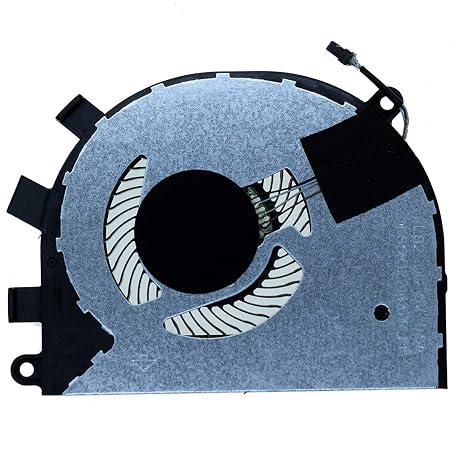
New Replacement CPU Cooling Fan for Dell inspiron 5584 15-5584 Latitude 3400 3500 P85F E3400 E3500 Series DC5V 0T6RHW DFS5K12214161H
87% of respondents would recommend this to a friend
Item #:
91040667
TZS 75589
Price Details
Excluding Shipping & Custom charges ( Shipping and custom charges will be calculated on checkout )
*All items will import from US
0 ratings
Write a review
In stock
 Imported from USA store
QTY:
Order now and get it around Saturday, September 19
Secured transaction
Ubuy works hard to protect your security and privacy. Our advanced payment security system ensures confidentiality by encrypting your information during transmission using AES (Advanced Encryption Standards) and SSL (Secure Socket Layer) protocols. Your payment details are 100% secure as we do not share your payment details with third party sellers.
Our Top Logistics Partners


Ensure compatibility with your laptop model for optimal cooling performance.

Fast
Shipping

Free
Return*

Secure Packaging

100% Original Products

PCI DSS Compliance

ISO 27001 Certified





Note: Step Down Voltage Transformer required for using electronics products of US store (110-120). Recommended power converters Buy Now.


What Stands Out
Compatibility
Designed specifically for Dell Inspiron 5584 and Latitude 3400/3500 series, ensuring seamless integration and optimal performance without compatibility issues.
Reliable Cooling
This cooling fan maintains efficient temperature control, preventing overheating and prolonging the life of your laptop components during intensive tasks.
Easy Installation
User-friendly design allows for quick and hassle-free installation, making it accessible for both tech-savvy users and DIY enthusiasts.
Product Details
| Power Connector Type | 4-Pin |
| Voltage | 5 volts |
| Wattage | 2.5 watts |
| Cooling Method | Air |
| Compatible Devices | Laptop |
| Noise Level | 30 db |
| Maximum Rotational Speed | 3200 rpm |
| Material Type | Metal |
| Brand Name | Rangale |
| Manufacturer | YDLan |
| Number of Items | 1 |
| Included Components | 1 piece Cooling Fan |
| Model | FL82 |
| Part Number | FL82 |
| Brand | Rangale |
| Material | Metal |
| Item Weight | 0.5 lbs (230 grams) |
Who Should Buy?

-
Laptop Repair Technicians
Ideal for technicians needing reliable cooling solutions for Dell Inspiron and Latitude series during laptop repairs.
-
Gamers
Beneficial for gamers to maintain optimal cooling, enhancing performance and preventing overheating during extended gaming sessions.
-
Students
Perfect for students using laptops for academic purposes, ensuring efficient cooling for prolonged study and multitasking.

-
Desktop Users
Not suitable for desktop PCs as this cooling fan is specifically designed for Dell laptop models only.
Product Description
New Replacement CPU Cooling Fan for Dell inspiron 5584 15-5584 Latitude 3400 3500 P85F E3400 E3500 Series DC5V 0T6RHW DFS5K12214161H
Have any Query? Chat with us
Customer Questions & Answers
-
Question:
What models is the New Replacement CPU Cooling Fan compatible with?
Answer: The New Replacement CPU Cooling Fan is specifically designed for several Dell models, including the Inspiron 5584, 15-5584, Latitude 3400, and Latitude 3500 series, among others. This broad compatibility ensures that users with these Dell computer models can effectively replace their damaged or malfunctioning fans without needing costly upgrades or entire unit replacements. If you're experiencing overheating issues or increased noise, this cooling fan can help restore your system to optimal performance. -
Question:
How can I ensure that I install the replacement CPU cooling fan correctly?
Answer: Installing the New Replacement CPU Cooling Fan requires careful attention to detail. Start by powering down your device and disconnecting it from the power source. Remove the back cover to access the cooling fan. Align the fan's connectors properly with the motherboard and screw it securely into place. Follow your device's service manual for specific instructions. Proper installation is crucial for preventing overheating and ensuring that the fan operates efficiently, contributing to the longevity of your Dell laptop. -
Question:
What are the signs that my CPU cooling fan needs to be replaced?
Answer: Common signs indicating that your CPU cooling fan may need replacement include unusual noise, frequent overheating, or the system shutting down unexpectedly. If your laptop is running hotter than usual or if the fan is not spinning properly, it may be time to replace it. Addressing these issues early with the New Replacement CPU Cooling Fan can prevent more significant hardware damage and maintain the overall performance of your Dell computer. -
Question:
What factors contribute to CPU cooling fan failure?
Answer: Several factors can lead to CPU cooling fan failure, including dust accumulation, age, and overheating. Over time, dust can clog the fan and heat sink, reducing airflow and efficiency. Additionally, prolonged exposure to high temperatures can wear out the fan’s motor. Monitoring your device for performance issues and cleaning it regularly can help extend the life of your CPU cooling fan, ensuring that it operates effectively, especially during intensive tasks like gaming or graphic design. -
Question:
Can replacing the CPU cooling fan improve my laptop's performance?
Answer: Yes, replacing a faulty CPU cooling fan can significantly enhance your laptop's performance. A working fan ensures the CPU maintains optimal temperatures, preventing thermal throttling that can slow down processing speeds during demanding tasks. By installing the New Replacement CPU Cooling Fan, users can refresh their device’s cooling capabilities, leading to better performance during tasks such as gaming, video editing, or running complex applications. -
Question:
Is the replacement CPU cooling fan quiet during operation?
Answer: The New Replacement CPU Cooling Fan is designed to operate quietly while still providing efficient cooling. Manufacturers often focus on minimizing noise levels for replacement fans to enhance user experience. However, some noise may occur due to system load or environmental factors. For best results, ensure your laptop is maintained properly and that the fan operates within its designed parameters, as excessive noise could indicate an underlying issue with either the fan or the system. -
Question:
How do I maintain my CPU cooling fan after installation?
Answer: Regular maintenance of your CPU cooling fan is key to its longevity. Ensure that your laptop is placed in a clean, dust-free area to minimize dust buildup. Periodically check and clean the fan and vents using compressed air to dislodge any accumulated dust. Monitoring the fan's performance and addressing any noise or overheating issues early can also extend its service life. Keeping your fan in good condition will help maintain optimum airflow and performance for your Dell laptop. -
Question:
Are there any special tools required for installation?
Answer: To install the New Replacement CPU Cooling Fan, you typically need basic tools like a screwdriver to remove the laptop's back cover and secure the fan in place. Depending on your model, you may also need anti-static equipment like a wrist strap to avoid damaging sensitive internal components. These tools are generally standard and can be found easily, making the installation process accessible even for those with minimal technical experience. -
Question:
How does a cooling fan contribute to the overall longevity of my laptop?
Answer: A cooling fan plays a crucial role in sustaining your laptop's life by regulating the temperature of the CPU and preventing overheating. Overheating can lead to hardware damage and system failures over time. By ensuring that your CPU stays within safe temperature ranges with the New Replacement CPU Cooling Fan, you can help enhance the device's reliability and lifespan, enabling it to perform effectively over an extended period. -
Question:
Where can I buy the New Replacement CPU Cooling Fan?
Answer: You can purchase the New Replacement CPU Cooling Fan for your Dell Inspiron and Latitude models at Ubuy. Ubuy offers a convenient shopping experience with a range of options for computer components, including reliable cooling fans. This ensures you have access to quality replacement parts to maintain your laptop's performance. Visit Ubuy to find the right fan that suits your needs.
Rangale CPU Cooling Fans Editorial Review
The New Replacement CPU Cooling Fan for Dell Inspiron 5584 and Latitude 3400/3500 series is designed with a 4-Pin power connector and operates at a voltage of 5 volts. This fan, featuring a maximum rotational speed of 3200 rpm, ensures efficient cooling via an air cooling method, maintaining your laptop’s performance. Users appreciate its quiet operation, with a noise level of only 30 dB, making it ideal for a peaceful working environment. Additionally, its durable metal construction adds to its reliability, making it a great fit for laptop cooling needs.
Customer Reviews & Ratings
1 customers ratings
-
5 Star
100%
-
4 Star
0%
-
3 Star
0%
-
2 Star
0%
-
1 Star
0%
Review this product
Share your thoughts with other customers
Pros
- High maximum rotational speed for efficient cooling
- Quiet operation at only 30 dB
- Durable metal construction for longevity
- Compatible with multiple Dell laptop models
- Easy installation with 4-Pin connector
Cons
- May require some technical skills for installation
Platform Trust & Buyer Confidence

MA
Mohammad
Verified buyer
“Excellent quality and original too,when ubuy send original things I will appreciate that ,I very satisfied thank you”
23 July 2026 · via Trustpilot
CK
Chitra
Verified buyer
“The order and delivery progress was communicated very well. Package arrived within the estimated time. Products arrived as expected in good condition.”
22-Jul-26 · via Trustpilot
K
kund
Verified buyer
“Good supply of products. Safe payment methods, and shipment worldwide! Genuine products.”
23-Jul-26 · via Trustpilot
OO
Onesi
Verified buyer
“Was my first time buying a product from Ubuy, but I found it so helpful. This is reliable. Gonna place a new order!”
22 July 2026 · via Trustpilot
SJ
SAO JOHN
Verified buyer
“Ubuy is a great online platform to buy stuff. Reliable, fast delivery time and great value for money. I've been using Ubuy online shopping platform for three years now and will continue to do so.”
23 July 2026 · via Trustpilot
Secure Checkout
Global Delivery
Easy Returns
Genuine Products
Product Price History
Important information
- Limitations : For products shipped internationally, please note that any manufacturer warranty may not be valid; manufacturer service options may not be available; product manuals, instructions, and safety warnings may not be in destination country languages; the products (and accompanying materials) may not be designed in accordance with destination country standards, specifications, and labeling requirements; and the products may not conform to destination country voltage and other electrical standards (requiring use of an adapter or converter if appropriate). The recipient is responsible for assuring that the product can be lawfully imported to the destination country. When ordering from Ubuy or its affiliates, the recipient is the importer of record and must comply with all laws and regulations of the destination country.
- Not all the products listed on Ubuy are for sale, as Ubuy is a global search engine. Products are subject to export/trade regulations.
TZS 75589
Order now and get it around Saturday, September 19
This item is not restrict in my country.(Please click on above link if this item is not restrict in your country, So our team will review and allow.)
QTY:
Secured transaction
PCI DSS compliant and ISO 27001:2022 certified, with encrypted payments and full buyer protection on every order.
Our Top Logistics Partners
Fastest cross-border delivery
Features & Benefits
- Compatible with various laptop models.
- Check the image to confirm product match.
- Comes as a single CPU cooling fan.
- Performance may vary based on manufacturer.
- Different part numbers may be used for the same fan.
- Essential for maintaining laptop temperature and performance.
Ubuy Assurance
Experience worry-free shopping with 100% original products, PCI DSS-compliant payment security, ISO 27001-certified data protection, the fastest cross-border delivery, free returns *, and secure packaging on every order.