0 ratings





Item #:
84805574
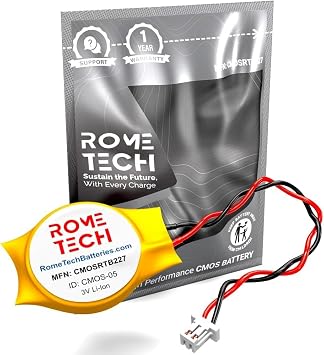
Rome Tech CMOS BIOS Battery for Lenovo ThinkPad X230, T510, T520 - Backup 3V RTC CR2032 with 2 Wire Cable
Item #:
84805574
TZS 50498
Price Details
Excluding Shipping & Custom charges ( Shipping and custom charges will be calculated on checkout )
*All items will import from US
0 ratings
Write a review
In stock
 Imported from USA store
QTY:
Order now and get it around Sunday, July 19
Secured transaction
Ubuy works hard to protect your security and privacy. Our advanced payment security system ensures confidentiality by encrypting your information during transmission using AES (Advanced Encryption Standards) and SSL (Secure Socket Layer) protocols. Your payment details are 100% secure as we do not share your payment details with third party sellers.
Our Top Logistics Partners


Enjoy extended reliability of the RTC battery and heat shrink of a high caliber - the CMOS laptop battery will last you for a long time.

Fast
Shipping

Free
Return*

Secure Packaging

100% Original Products

PCI DSS Compliance

ISO 27001 Certified


Note: Step Down Voltage Transformer required for using electronics products of US store (110-120). Recommended power converters Buy Now.


Product Details
- Rome Tech CMOS Battery best suits to replace your broken or non-working old BIOS battery - we provide premium quality only
- CR2032 laptop battery COMPATIBLE with Lenovo ThinkPad X230 (Tablet) / Lenovo ThinkPad T510 / Lenovo ThinkPad T520
- Enjoy extended reliability of the RTC battery and heat shrink of a high caliber - the CMOS laptop battery will last you for a long time
- The size of the CMOS battery is extremely small - will fit in almost any electronic device requires 3V Battery connector with 2 pins and 2 wires
- Quick and simple CMOS Battery installation takes only 10 minutes of your time. Try our customer service for resolving any issues during BIOS battery replacement
| Number of Batteries | 1 Lithium Ion batteries required. |
| Brand | Rome Tech |
| Model Name | 22REGPN2032M-25 |
| UPC | 712302255643 |
| Manufacturer | Rome Tech |
| Battery Capacity | 225 Milliamp Hours |
| Voltage | 3 Volts (AC) |
| Reusability | No |
| Compatible Phone Models | Lenovo ThinkPad X230 (Tablet), Lenovo ThinkPad T510, Lenovo ThinkPad T520 |
| Unit Count | 1.0 Count |
| Battery Weight | 3 Grams |
| Antenna Location | Indoor |
| Battery Cell Type | Lithium Ion |
| Battery Cell Composition | Lithium Ion |
| Recommended Uses For Product | Indoor |
Dangerous Goods
To avoid the delay in customs clearance process for Dangerous Goods, the shipment shall be opened at our warehouse facility to check the severity of hazardous components. Please see the list of Dangerous goods here.
Product Description
Have any Query? Chat with us
Customer Questions & Answers
-
Question:
What is the purpose of the Rome Tech CMOS BIOS Battery?
Answer: The Rome Tech CMOS BIOS Battery is designed to provide a backup power source to the CMOS chip in your Lenovo ThinkPad X230, T510, and T520 laptops. It ensures that system settings, such as date and time, are maintained even when the laptop is powered off. A failing or dead battery can lead to the loss of these configurations, affecting overall system performance. If you notice your laptop losing time or settings, replacing the CMOS battery can be a simple yet effective solution. -
Question:
How do I know if the CMOS battery needs replacing?
Answer: Indicators that your CMOS battery may require replacement include your system clock losing time, BIOS settings reverting to factory defaults, or error messages during startup. If you experience these issues, the battery is likely weak or depleted. Regular maintenance checks can help in identifying these problems early, ensuring that your laptop operates without interruptions. -
Question:
Can I replace the CMOS battery myself?
Answer: Yes, replacing the CMOS battery is often a straightforward process, especially for skilled users. Ensure you have the correct tools and follow video tutorials or user manuals for your specific Lenovo model. This DIY approach can save time and provide a sense of accomplishment. However, if unsure, consulting a professional technician is advisable to avoid any potential damage to your laptop. -
Question:
What specifications should I look for in a CMOS battery?
Answer: When selecting a CMOS battery, ensure it is a CR2032 type, compatible with your Lenovo ThinkPad models. The battery should also have two wires to facilitate connection within the device. Quality is paramount, so opt for reputable brands like Rome Tech to ensure reliability and longevity. By choosing the right specifications, you can maintain optimal laptop functionality. -
Question:
How can I prolong the life of my CMOS battery?
Answer: To extend the life of your CMOS battery, avoid leaving your laptop powered off for extended periods. Regularly using the laptop keeps the battery charged and functional. Additionally, ensure that your device is well-ventilated to reduce overheating, which can impact battery lifespan. Implementing these practices can help ensure a reliable power source for your laptop's critical settings. -
Question:
What are the signs of a failing Lenovo ThinkPad battery?
Answer: Symptoms of a failing battery include diminished operating time while unplugged, unexpected shutdowns, and bloating. You might also notice your laptop taking too long to charge or failing to recognize the power adapter. Recognizing these signs early can prevent further complications and help maintain your device's performance and reliability. -
Question:
Is the Rome Tech CMOS battery compatible with other devices?
Answer: While the Rome Tech CMOS battery is specifically designed for Lenovo ThinkPad X230, T510, and T520 models, its CR2032 specifications mean it may also be compatible with other devices requiring a similar battery type. Always cross-reference compatibility to avoid any functional issues with other laptops. This versatility can make the battery a valuable addition to your toolbox if you own multiple devices. -
Question:
What tools are needed for installation of the CMOS battery?
Answer: To install the Rome Tech CMOS battery, you will typically need a small Phillips screwdriver and possibly a plastic prying tool for opening the laptop’s casing. Ensure you work on an anti-static surface and ground yourself before handling internal components. Having the right tools can streamline the replacement process, ensuring a smooth transition and maintaining your laptop’s performance. -
Question:
Are there any risks involved in replacing the CMOS battery?
Answer: Replacing the CMOS battery carries minimal risks if done correctly. However, mishandling can lead to short-circuiting components or damaging other internal parts. To mitigate these risks, always follow safety protocols, such as grounding yourself and using appropriate tools. Awareness and caution during the replacement process will help ensure your laptop remains safe and functional. -
Question:
Where can I buy the Rome Tech CMOS BIOS Battery in Tanzania?
Answer: You can purchase the Rome Tech CMOS BIOS Battery for your Lenovo ThinkPad models through Ubuy in Tanzania. They offer a wide range of compatible devices and components, ensuring you find the right battery for your needs. Check their website for availability and specific details to ensure a seamless shopping experience.
Rome Tech Batteries Editorial Review
No editorial reviews found
Customer Reviews & Ratings
2 customers ratings
-
5 Star
100%
-
4 Star
0%
-
3 Star
0%
-
2 Star
0%
-
1 Star
0%
Review this product
Share your thoughts with other customers
Platform Trust & Buyer Confidence

MT
Mohd
Verified buyer
“The product received very good packaging & safe…Thank You”
16 June 2026 · via Trustpilot
SJ
Shawati
Verified buyer
“Accurate delivery timing given”
16 June 2026 · via Trustpilot
YB
Youcef
Verified buyer
“Not madly expensive like I thought, and much quicker than promised.”
15 June 2026 · via Trustpilot
LM
Leila
Verified buyer
“Never dealt with Ubuy before, but everything worked out great. Seamless cross border purchasing and shipping. Thanks!”
6/7/2026 · via Trustpilot
KA
Kwame
Verified buyer
“The process was smooth, with clear communication and timelines. This was my 1st purchase and I am really impressed. I will definitely be coming back.”
12 June 2026 · via Trustpilot
Secure Checkout
Global Delivery
Easy Returns
Genuine Products
Product Price History
Important information
- Limitations : For products shipped internationally, please note that any manufacturer warranty may not be valid; manufacturer service options may not be available; product manuals, instructions, and safety warnings may not be in destination country languages; the products (and accompanying materials) may not be designed in accordance with destination country standards, specifications, and labeling requirements; and the products may not conform to destination country voltage and other electrical standards (requiring use of an adapter or converter if appropriate). The recipient is responsible for assuring that the product can be lawfully imported to the destination country. When ordering from Ubuy or its affiliates, the recipient is the importer of record and must comply with all laws and regulations of the destination country.
- Not all the products listed on Ubuy are for sale, as Ubuy is a global search engine. Products are subject to export/trade regulations.
TZS 50498
Order now and get it around Sunday, July 19
This item is not restrict in my country.(Please click on above link if this item is not restrict in your country, So our team will review and allow.)
QTY:
Secured transaction
PCI DSS compliant and ISO 27001:2022 certified, with encrypted payments and full buyer protection on every order.
Our Top Logistics Partners
Fastest cross-border delivery
Features & Benefits
- Premium quality replacement for broken CMOS BIOS batteries.
- Compatible with Lenovo ThinkPad X230, T510, and T520.
- Offers extended reliability and longevity.
- Compact size fits in various electronic devices requiring a 3V battery.
- Quick installation process, taking only 10 minutes.
- Excellent customer service support for installation issues.
Ubuy Assurance
Experience worry-free shopping with 100% original products, PCI DSS-compliant payment security, ISO 27001-certified data protection, the fastest cross-border delivery, free returns *, and secure packaging on every order.