- Home Page /
- Electronics /
- Computer Accessories /
- Computer Accessories & Peripherals /
- Input Devices /
- Graphics Tablets /
- Wacom Cintiq Pro 22 Drawing Tablet with Scree...
0 ratings




Item #:
220324260
Wacom Cintiq Pro 22 Drawing Tablet with Screen, 21.5" Ultra HD 4K. 10-bit 120Hz Touchscreen Display Graphic Arts Tablet with Pro Pen 3, for Windows
85% of respondents would recommend this to a friend
Item #:
220324260
TZS 10767591
Price Details
Excluding Shipping & Custom charges ( Shipping and custom charges will be calculated on checkout )
*All items will import from US
In stock
 Imported from USA store
QTY:
Only 13 items left in stock.
Order now and get it around Wednesday, July 01
Secured transaction
Ubuy works hard to protect your security and privacy. Our advanced payment security system ensures confidentiality by encrypting your information during transmission using AES (Advanced Encryption Standards) and SSL (Secure Socket Layer) protocols. Your payment details are 100% secure as we do not share your payment details with third party sellers.
Our Top Logistics Partners


The Wacom Cintiq Pro 22 is designed for professionals to create a harmonious creative process with stunning 4K clarity and unparalleled precision.

Fast
Shipping

Free
Return*

Secure Packaging

100% Original Products

PCI DSS Compliance

ISO 27001 Certified


Note: Step Down Voltage Transformer required for using electronics products of US store (110-120). Recommended power converters Buy Now.


What Stands Out
Stunning 4K Resolution
The 4K display delivers exceptional clarity and detail, allowing artists to see their work in high definition, enhancing precision in drawing and editing.
8192 Pen Pressure
With 8192 levels of pen pressure sensitivity, the Cintiq Pro 24 enables smooth and precise strokes, catering to the most demanding creative projects for artists and designers.
99% Adobe RGB
Achieving 99% Adobe RGB color gamut ensures vibrant and accurate colors, making it easier for creatives to bring their visions to life with stunning fidelity.
Product Details
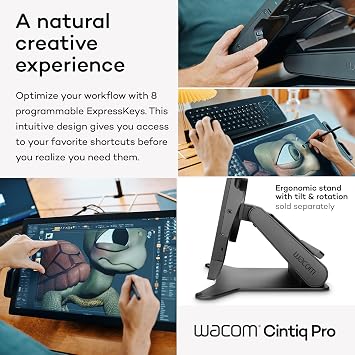
- Customizable Display: Graphics tablet features 8 ExpressKeys, adjustable on-screen menus, and improved multi-touch and pen gestures; ideal for creative professionals like graphic designers
- Remarkable Pen Performance: Pro Pen 3 features 8192 levels of pressure sensitivity, 3 side switches, customizable pen grips, and adjustable weight and center of balance
- Vibrant Color Display: Windows and macOS tablet features professional-quality Ultra HD 4K display and showcases a refresh rate of 120Hz allowing for near-zero latency
- Tablet with Easy Stand: Adjust this professional arts tablet to your comfort level with the Easy Stand, which offers a fixed angle height; attach the pen tray to the display to personalize even more
- Includes: Wacom Cintiq Pro 22 digital drawing pad, Pro Pen 3, 2 extra grips, 3 extra button plates, balance piece, 10 replacement nibs, nib remover, USB-C cable, AC adapter, power cord, start guide
| Brand | Wacom |
| Model Name | Wacom Cintiq Pro 22 |
| Built-In Media | Digital Pen, HDMI Cable, Pen Holder, Power Cord, USB Cable |
| Target Audience | Student, Teacher |
| Model Number | DTH227K0A |
| Manufacturer | Wacom Technology Corporation |
| UPC | 753218984258 |
| Mfr Part Number | DTH227K0A |
| Unit Count | 1.0 Count |
| Connectivity Technology | USB-C (DP alt mode) x1, USB-C x1, USB-A x1, HDMI x1, Mini DisplayPort x1 |
| Pressure Sensitivity | 8192 Levels |
| Operating System | Windows, macOS |
| Additional Features | 10-point multi-touch |
| Specific Uses For Product | 3D Modelling, Animation, Designing |
| Compatible Devices | Desktop, Laptop |
| Display Type | LCD |
| Native Resolution | 3840x2160 |
| Screen Size | 21.5 Inches (54.6 cm) |
| Item Weight | 11 Pounds (4.99 kg) |
| Item Dimensions L x W | 20.3"L x 12.3"W (51.6 cm) |
| Active Surface Area | 18.7 x 10.5 |
| Color | Black |
| Special Feature | 10-point multi-touch |
What's in the box
Digital Pen
USB Cable
HDMI Cable
Pen Holder
Power Cord
Who Should Buy?

-
Professional Artists
Ideal for professional artists seeking a high-quality display for digital drawing and illustration tasks.
-
Graphic Designers
Perfect for graphic designers needing precise color accuracy and detail in their design projects.
-
Animation Creators
Great for animators who require high resolution and responsive pen pressure for detailed animation work.

-
Casual Users
Not suitable for casual users who need a simple and less expensive drawing solution for occasional use.
-
Budget-Conscious
May not be ideal for those on a budget, as it is a premium-priced professional device.
-
Non-Graphic Roles
Unsuitable for users in roles unrelated to graphic design or digital art, lacking practical application for them.
Product Description
Have any Query? Chat with us
Related Searches
Customer Questions & Answers
-
Question:
What are the main features of the Wacom Cintiq Pro 16?
Answer: The Wacom Cintiq Pro 16 boasts a stunning 4K resolution display and comes equipped with an advanced pen that offers 8192 levels of pressure sensitivity for a natural drawing experience. This model also covers 98% of the Adobe RGB color space, ensuring vibrant and accurate colors for professional artwork. Additionally, it features multi-touch capability, allowing artists to navigate intuitively like on a tablet, making it suitable for both creative and professional needs. -
Question:
Is the Wacom Cintiq Pro 16 compatible with all operating systems?
Answer: Yes, the Wacom Cintiq Pro 16 is designed to be compatible with both Windows and macOS operating systems. This compatibility allows users from various platforms to seamlessly integrate the device into their workflow. It's ideal for artists and designers who work across different devices, providing flexibility and ease of use regardless of your preferred operating system. -
Question:
What kind of artworks can I create with the Wacom Cintiq Pro 16?
Answer: With the Wacom Cintiq Pro 16, you can create a wide range of artwork including illustrations, digital paintings, graphic designs, animations, and more. The high-resolution display combined with the pen's sensitivity allows for intricate detailing and realism in your creations. Whether you're a beginner looking to explore digital art or a professional animator, this tool will enhance your artistic capabilities. -
Question:
Does the Wacom Cintiq Pro 16 come with drawing software?
Answer: The Wacom Cintiq Pro 16 does not come bundled with drawing software, but it is compatible with a variety of popular digital art applications such as Adobe Photoshop, Corel Painter, and Clip Studio Paint. Users can choose software that best suits their needs. This flexibility allows artists to tailor their toolset according to their workflow and preferences, making it a versatile choice for any digital artist. -
Question:
How does the pen pressure sensitivity affect my drawing experience?
Answer: The 8192 levels of pen pressure sensitivity on the Wacom Cintiq Pro 16 allow for precise control over line thickness and opacity, which can greatly influence your drawing experience. This means you can create a varied range of strokes, mimicking traditional art techniques. Artists can take advantage of this feature to produce more nuanced and delicate work, making it essential for detailed illustrations and professional-grade projects. -
Question:
Can I use the Wacom Cintiq Pro 16 for photo editing?
Answer: Absolutely! The Wacom Cintiq Pro 16 is an excellent tool for photo editing thanks to its precise pen control and high-quality display. Photographers and graphic designers can benefit from the accuracy and sensitivity of the pen, allowing them to make fine adjustments and retouches with ease. Whether you're applying filters, refining textures, or making color corrections, this drawing monitor will enhance your photo editing workflow significantly. -
Question:
What accessories are recommended for the Wacom Cintiq Pro 16?
Answer: For the Wacom Cintiq Pro 16, it’s recommended to get a glove to prevent smudging the screen while drawing and to improve grip. Additional nibs for the pen are also advisable, as they wear down with use over time. A stand can help set the display at a comfortable angle, enhancing ergonomics during long art sessions. All these accessories aim to improve your overall drawing experience! -
Question:
How do I connect the Wacom Cintiq Pro 16 to my computer?
Answer: Connecting the Wacom Cintiq Pro 16 to your computer is straightforward. Using the provided USB-C and HDMI cables, simply connect the drawing monitor to your device. Once connected, install the Wacom drivers from the official website to ensure full functionality. This quick setup enables you to start your creative projects without delay! -
Question:
What resolution does the display of the Wacom Cintiq Pro 16 support?
Answer: The Wacom Cintiq Pro 16 supports a 4K resolution of 3840 x 2160 pixels, providing stunning clarity and detail in your artwork. This high resolution ensures that every brushstroke and color is rendered accurately, which is especially beneficial for artists who need precision in their work. Whether you're illustrating, designing, or animating, you'll appreciate the visual quality that this monitor delivers. -
Question:
Where can I buy the Wacom Cintiq Pro 16 in Tanzania?
Answer: You can purchase the Wacom Cintiq Pro 16 Creative Pen and Touch Display at Ubuy. Ubuy offers a reliable platform for buying this advanced graphic drawing monitor, ensuring a smooth purchasing experience. Their service includes a variety of options to meet your specific needs, providing access to this professional tool right from your preferred location within Tanzania.
Wacom Graphics Tablets DTH227K0A Editorial Review


The Wacom Cintiq Pro 22 Drawing Tablet with Screen is a highly acclaimed tool among artists, praised for its exceptional drawing experience and impressive display quality. Users have reported that the etched glass surface provides an enjoyable tactile feedback reminiscent of drawing on paper, which significantly enhances their creative process. The tablet’s 21.5-inch Ultra HD 4K screen delivers vibrant colors, and the 120Hz refresh rate offers smooth visuals, making it not only suitable for drawing but also for gaming. Although the touch functionality is sometimes viewed as secondary to actual drawing, it proves useful for tasks such as zooming and navigating the canvas, especially for those transitioning from other tablets like the iPad Pro. However, many recommend disabling certain gestures for a seamless drawing experience, particularly when using software like Clip Studio Paint. While many users regard the overall build quality and ease of use as unparalleled in comparison to other options on the market, particularly off-brand alternatives, some have pointed out a few downsides. The pen, while ergonomic and featuring adjustable weight, may feel less durable than expected for such a premium device. Additionally, users have criticized the pen holder design which restricts access to buttons and cooling vents when mounted. Though some have reported not noticing noise from the tablet's cooling system, others have mentioned that it may not be entirely silent. Overall, the Wacom Cintiq Pro 22 is highly recommended for serious artists willing to invest in a high-quality drawing tablet that provides a holistic and professional-grade experience. **
Customer Reviews & Ratings
649 customers ratings
-
5 Star
80%
-
4 Star
8%
-
3 Star
3%
-
2 Star
2%
-
1 Star
7%
Review this product
Share your thoughts with other customers
Pros
- Exceptional drawing experience with smooth and precise control.
- Etched glass surface feels natural like drawing on paper.
- High-quality 4K display with vibrant colors and 120Hz refresh rate.
- Ergonomic pen design with adjustable weight enhances usability.
- Industry-standard performance, suitable for professional work.
Cons
- Touch functionality can be cumbersome; may require disabling gestures while drawing.
Top selling Wacom Cintiq Pro in Hong Kong




Last Updated on June 8, 2026
Product Price History
Important information
- Limitations : For products shipped internationally, please note that any manufacturer warranty may not be valid; manufacturer service options may not be available; product manuals, instructions, and safety warnings may not be in destination country languages; the products (and accompanying materials) may not be designed in accordance with destination country standards, specifications, and labeling requirements; and the products may not conform to destination country voltage and other electrical standards (requiring use of an adapter or converter if appropriate). The recipient is responsible for assuring that the product can be lawfully imported to the destination country. When ordering from Ubuy or its affiliates, the recipient is the importer of record and must comply with all laws and regulations of the destination country.
- Not all the products listed on Ubuy are for sale, as Ubuy is a global search engine. Products are subject to export/trade regulations.
TZS 10767591
Order now and get it around Wednesday, July 01
This item is not restrict in my country.(Please click on above link if this item is not restrict in your country, So our team will review and allow.)
QTY:
Only 13 items left in stock.
Secured transaction
Ubuy works hard to protect your security and privacy. Our advanced payment security system ensures confidentiality by encrypting your information during transmission using AES (Advanced Encryption Standards) and SSL (Secure Socket Layer) protocols. Your payment details are 100% secure as we do not share your payment details with third party sellers.
Our Top Logistics Partners
Fastest cross-border delivery
Features & Benefits
- Designed for professionals to elevate the creative process.
- Features an ultra HD 4K 22” display with edge-to-edge tempered glass.
- Pro Pen 3 offers 8,192 levels of pressure sensitivity for precision.
- Supports customizable settings with ExpressKeys and programmable side switches.
- Vibrant color display with a 120Hz refresh rate for near-zero latency.
- Compatible with both Windows and macOS for versatile use.