- Home Page /
- Electronics /
- Security & Surveillance /
- Biometrics /
- USB Fingerprint Reader for Windows | Windows Hello & 10...
0 ratings


Item #:
72589000
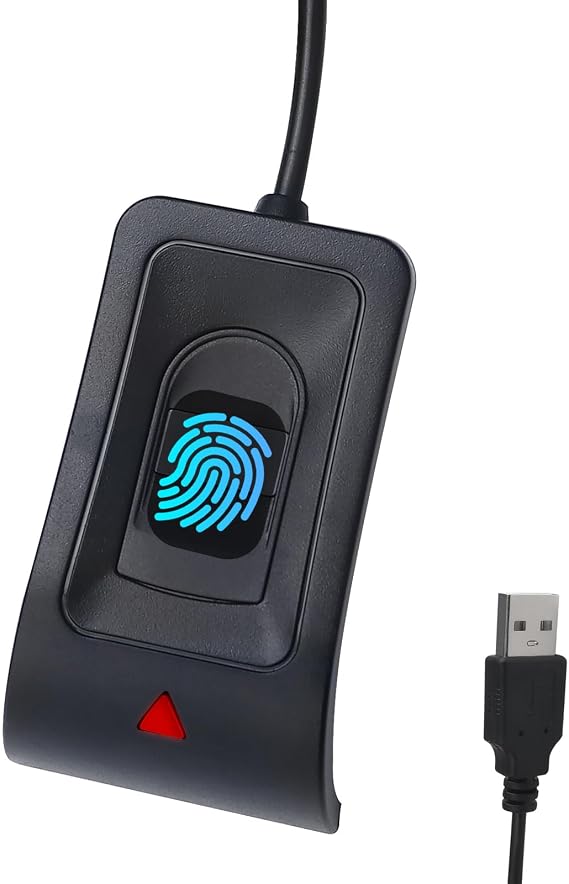
USB Fingerprint Reader for Windows | Windows Hello & 10/11, Auto Driver Install, 5ft Cable, Password-Free Login
77% of respondents would recommend this to a friend
Item #:
72589000
TZS 107848
Price Details
Excluding Shipping & Custom charges ( Shipping and custom charges will be calculated on checkout )
*All items will import from US
0 ratings
Write a review
In stock
 Imported from USA store
QTY:
Order now and get it around Friday, September 04
Secured transaction
Ubuy works hard to protect your security and privacy. Our advanced payment security system ensures confidentiality by encrypting your information during transmission using AES (Advanced Encryption Standards) and SSL (Secure Socket Layer) protocols. Your payment details are 100% secure as we do not share your payment details with third party sellers.
Our Top Logistics Partners


Login on your computer using Microsoft's built-in Windows Hello login feature with just your fingerprint, no need to remember usernames and passwords.

Fast
Shipping

Free
Return*

Secure Packaging

100% Original Products

PCI DSS Compliance

ISO 27001 Certified





Note: Step Down Voltage Transformer required for using electronics products of US store (110-120). Recommended power converters Buy Now.


What Stands Out
Effortless Setup
The JIANBOLAND USB Fingerprint Reader features automatic driver installation, ensuring quick and hassle-free setup on Windows 10/11 without complicated configurations.
Extended Range
With a 5ft extension cable, users can position the fingerprint reader at their preferred distance, enhancing convenience and accessibility in various workspace layouts.
Enhanced Security
Experience password-free operation with advanced fingerprint authentication, offering superior security and seamless access, reducing the risk of unauthorized entry compared to traditional password methods.
Product Details
- Login to your computer using Microsoft's built-in Windows Hello login feature with just your fingerprint
- Microsoft Certification: Windows System Biometric Framework, Windows Hello Fingerprint Support
- Plug and play - no driver installation required, automatically recognized in most cases
- Can store up to 10 different fingerprints for multiple users, exceeding industry standards for False Rejection Rate (0.1%) and False Acceptance Rate (0.001%)
- Recognition speed <0.5S, providing fast and secure login
- After-sales service includes 30 days free return and 24-hour response to any questions, comes with a 5ft/1.5m USB extension cable for convenient desktop use
| Connectivity Technology | USB Type A |
| Additional Features | Linux&MAC not supported |
| Compatible Devices | Personal Computer |
| Data Transfer Rate | 5000 megabits_per_second |
| Hardware Interface | USB |
| Slot Count | 10 |
| Operating System | Windows 10 |
| Color | Black |
| Item Dimensions L x W x H | 2.6"L x 1.5"W x 1"H (6.6 x 3.8 x 2.5 cm) |
| Brand | JIAN BOLAND |
| Unit Count | 1 Count |
| UPC | 717664826555 717664826586 |
| Global Trade Identification Number | 00717664826555 |
| Manufacturer | JIANBOLAND |
| Model Number | WA28 |
| Mfr Part Number | WA28 |
| Special Feature | Linux&MAC not supported |
Who Should Buy?

-
Office Professionals
Ideal for professionals seeking secure login methods without the hassle of remembering complex passwords.
-
Tech-Savvy Users
Perfect for individuals comfortable with technology who want seamless integration with Windows Hello.
-
Frequent Gamers
Suitable for gamers looking for quick access to their systems without interrupting gameplay for password input.

-
Basic Users
Not suitable for users who prefer traditional login methods and lack familiarity with biometric technology.
Product Description
USB Fingerprint Reader for Windows | Windows Hello & 10/11, Auto Driver Install, 5ft Cable, Password-Free Login
Have any Query? Chat with us
Customer Questions & Answers
-
Question:
What operating systems are compatible with the JIANBOLAND USB Fingerprint Reader?
Answer: The JIANBOLAND USB Fingerprint Reader is compatible with Windows 10 and Windows 11. This feature allows users to utilize Windows Hello for secure logins and password management. The automatic driver installation simplifies the setup process, ensuring that you can start using this biometric device without any technical hassles. For users who prioritize security and efficiency, this fingerprint reader offers a modern solution to password management, enhancing both accessibility and protection of personal data. -
Question:
How does the automatic driver installation work?
Answer: The JIANBOLAND USB Fingerprint Reader utilizes plug-and-play technology that initiates automatic driver installation upon connection to your device. This ensures that users do not have to manually download drivers or software, which can be time-consuming and confusing. Simply connect the device to a USB port, and it will install the necessary drivers automatically. This makes it ideal for users looking for a hassle-free setup experience, allowing them to quickly access their systems with a fingerprint scan. -
Question:
What is the length of the extension cable, and how does it enhance usability?
Answer: The JIANBOLAND USB Fingerprint Reader comes with a 5ft extension cable, providing flexibility in positioning the device. This longer cable allows users to place the fingerprint reader at a convenient distance from their computer, making it easier to scan fingerprints without rearranging their workstation. For instance, if your USB ports are hard to reach or if you want the reader on the desk for easier access, the extension cable ensures a comfortable setup that complements various workspace designs. -
Question:
Can I use this fingerprint reader for applications other than Windows login?
Answer: Yes, the JIANBOLAND USB Fingerprint Reader can be used for various applications beyond logging into Windows. Users can leverage the fingerprint reader for secure authentication in supported applications, allowing for enhanced security across different platforms. Scenarios may include secure access to sensitive files, software, and online banking services that require biometric authentication, making it an essential tool for anyone looking to bolster their digital security. -
Question:
Is the fingerprint recognition technology reliable and fast?
Answer: The JIANBOLAND USB Fingerprint Reader utilizes advanced optical sensing technology to ensure quick and reliable fingerprint recognition. This technology typically provides near-instantaneous recognition, allowing users to unlock their devices almost instantly. In practice, this means you can access your computer or secure applications swiftly, optimizing your workflow. With an accurate enrollment process, the reader minimizes false rejections, enhancing user satisfaction and security. -
Question:
What is the setup process for the fingerprint reader?
Answer: Setting up the JIANBOLAND USB Fingerprint Reader is straightforward. After connecting the device to your computer’s USB port, the automatic driver installation begins. Once installed, users can follow the on-screen prompts to enroll their fingerprints through the Windows Hello feature. This process typically involves scanning a few different angles of your finger for accurate recognition. It’s an efficient and user-friendly setup that caters to both tech-savvy individuals and those less familiar with technology. -
Question:
Does the fingerprint reader require any special software or drivers?
Answer: The JIANBOLAND USB Fingerprint Reader does not require any special software or drivers beyond what is automatically installed. The device is designed to work seamlessly with Windows Hello, which manages the biometric data and integration with your operating system. This eliminates the need for additional downloads or installations, making it a convenient option for users who want to integrate biometric security into their computing experience without unnecessary steps. -
Question:
What is the build quality of the JIANBOLAND USB Fingerprint Reader like?
Answer: The JIANBOLAND USB Fingerprint Reader is built with durable materials designed to withstand everyday use. Its compact size and ergonomic design make it easily portable, while its sturdy construction ensures longevity. Users can expect a reliable product that is suited for both office and personal environments. Whether you’re frequently moving it between different locations or using it as a permanent fixture at your desk, this fingerprint reader is designed to offer both durability and functionality. -
Question:
What should I do if the fingerprint reader is not recognized by my PC?
Answer: If the JIANBOLAND USB Fingerprint Reader is not recognized by your PC, first ensure that it is securely plugged into a functioning USB port. You can also try connecting it to a different USB port to rule out a faulty connection. If the issue persists, a quick restart of your system may refresh the driver recognition. Additionally, ensure that your operating system is updated, as this can sometimes resolve compatibility issues. If all else fails, consulting the user manual or reaching out to customer support can provide further assistance. -
Question:
Where can I buy the JIANBOLAND USB Fingerprint Reader?
Answer: You can purchase the JIANBOLAND USB Fingerprint Reader on Ubuy in Tanzania. Ubuy provides a convenient shopping platform where you can find this fingerprint reader along with various other tech accessories. Their user-friendly interface and customer support make it easy to complete your purchase and ensure you have reliable biometric security for your computing needs. Don’t forget to check for any available offers or deals on their website!
JIAN BOLAND Biometrics WA28 Editorial Review
The JIANBOLAND USB Fingerprint Reader is a tool designed to enable users to log in to their Windows devices without a password. It works with Windows 10 and 11 and has plug-and-play functionality with automatic driver installation. It comes with a 5ft extension cable and can store up to 10 fingerprints. Reviews for the product are mixed. Some customers reported that it worked well with Windows Hello and was a great tool for the value. However, one customer had trouble getting the reader to work with Windows 11 and eventually returned it for a refund. Another customer found that installation was painless and the fingerprint registration process was simple and quick, but they were unsure about the device's durability. In summary, the JIANBOLAND USB Fingerprint Reader is a reasonably priced tool for Windows users who want to log in without a password. While some customers have reported issues, others found it to be a great value.
Customer Reviews & Ratings
1 customers ratings
-
5 Star
100%
-
4 Star
0%
-
3 Star
0%
-
2 Star
0%
-
1 Star
0%
Review this product
Share your thoughts with other customers
Pros
- Reasonably priced
- Plug-and-play functionality
- Automatic driver installation
- Can store up to 10 fingerprints
Cons
- Mixed reviews regarding functionality
Platform Trust & Buyer Confidence

MA
Mohammad
Verified buyer
“Excellent quality and original too,when ubuy send original things I will appreciate that ,I very satisfied thank you”
23 July 2026 · via Trustpilot
CK
Chitra
Verified buyer
“The order and delivery progress was communicated very well. Package arrived within the estimated time. Products arrived as expected in good condition.”
22-Jul-26 · via Trustpilot
K
kund
Verified buyer
“Good supply of products. Safe payment methods, and shipment worldwide! Genuine products.”
23-Jul-26 · via Trustpilot
OO
Onesi
Verified buyer
“Was my first time buying a product from Ubuy, but I found it so helpful. This is reliable. Gonna place a new order!”
22 July 2026 · via Trustpilot
SJ
SAO JOHN
Verified buyer
“Ubuy is a great online platform to buy stuff. Reliable, fast delivery time and great value for money. I've been using Ubuy online shopping platform for three years now and will continue to do so.”
23 July 2026 · via Trustpilot
Secure Checkout
Global Delivery
Easy Returns
Genuine Products
Product Price History
Important information
- Limitations : For products shipped internationally, please note that any manufacturer warranty may not be valid; manufacturer service options may not be available; product manuals, instructions, and safety warnings may not be in destination country languages; the products (and accompanying materials) may not be designed in accordance with destination country standards, specifications, and labeling requirements; and the products may not conform to destination country voltage and other electrical standards (requiring use of an adapter or converter if appropriate). The recipient is responsible for assuring that the product can be lawfully imported to the destination country. When ordering from Ubuy or its affiliates, the recipient is the importer of record and must comply with all laws and regulations of the destination country.
- Not all the products listed on Ubuy are for sale, as Ubuy is a global search engine. Products are subject to export/trade regulations.
TZS 107848
Order now and get it around Friday, September 04
This item is not restrict in my country.(Please click on above link if this item is not restrict in your country, So our team will review and allow.)
QTY:
Secured transaction
PCI DSS compliant and ISO 27001:2022 certified, with encrypted payments and full buyer protection on every order.
Our Top Logistics Partners
Fastest cross-border delivery
Features & Benefits
- USB fingerprint reader for Windows 10/11
- Supports Windows Hello login feature
- Plug and play, no driver installation required
- Can store up to 10 different fingerprints
- Fast recognition speed of <0.5S
- Comes with 5ft USB extension cable
Ubuy Assurance
Experience worry-free shopping with 100% original products, PCI DSS-compliant payment security, ISO 27001-certified data protection, the fastest cross-border delivery, free returns *, and secure packaging on every order.