0 ratings
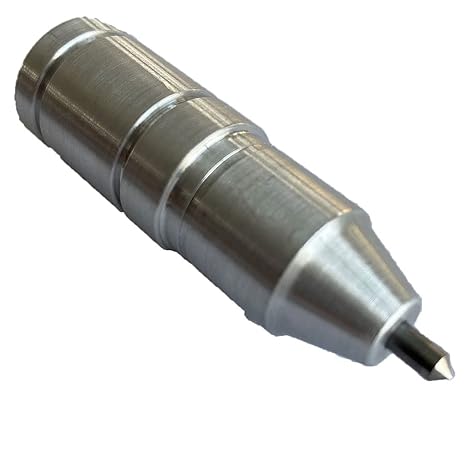
Silhouette Cameo 4 Engraving Tip
Your Cameo 4 can now engrave or etch on pretty much anything you would normally cut as long as it is less than 3mm.
Silhouette Cameo 4 Engraving Tip
Item #: 20752475

Silhouette Cameo 4 Engraving Tip

Item #: 20752475

TZS 93546

Price Details

Excluding Shipping & Custom charges ( Shipping and custom charges will be calculated on checkout )

*All items will import from US

0 ratings Write a review
In stock
us Imported from USA store

QTY:

Order now and get it around Tuesday, September 15
Our Top Logistics Partners
  • fedex
  • dhl
Your Cameo 4 can now engrave or etch on pretty much anything you would normally cut as long as it is less than 3mm.
U-Care Warranty:
None
Select a Plan
fast shipping

Fast
Shipping

free return

Free
Return*

secure packaging

Secure Packaging

100% original products

100% Original Products

pci-dss

PCI DSS Compliance

iso certified

ISO 27001 Certified


paypal payment
visa payment
mastercard payment
mobile money payment
sepa payment
Note: Step Down Voltage Transformer required for using electronics products of US store (110-120). Recommended power converters Buy Now.

What Stands Out

Precision Engraving
Achieve detailed and accurate engravings on various materials, enhancing your creative projects with a professional finish that sets your work apart from competitors.
Versatile Compatibility
Easily integrates with the Silhouette Cameo 4, expanding its functionality to cater to a wider range of crafting possibilities and materials, from metals to wood.
User-Friendly Design
Designed for ease of use, this engraving tip allows both beginners and experienced crafters to create stunning designs effortlessly, increasing workflow efficiency and creativity.

Product Details

Shop Silhouette Cameo 4 Engraving Tip online at a best price in Tanzania. B084T6BZYV
Package Weight1 Pound

Who Should Buy?

Suitable For
  • Craft Enthusiasts

    Those who enjoy personalized crafts can use the engraving tip to add unique designs to various materials.

  • Small Business Owners

    Ideal for entrepreneurs creating custom products, enhancing brand identity through personalized engraving options.

  • DIY Hobbyists

    Perfect for hobbyists interested in creating custom gifts or home décor with intricate engraved designs.

Not Suitable For
  • Heavy Industrial Users

    Not suitable for industrial-grade engraving jobs that require high durability and precision over a wide range of materials.

Product Description

Silhouette Cameo 4 Engraving Tip

Have any Query? Chat with us

Customer Questions & Answers

  • Question: What is the Silhouette Cameo 4 Engraving Tip?

    Answer: The Silhouette Cameo 4 Engraving Tip is a specialized tool designed to engrave various materials using the Silhouette Cameo 4 cutting machine. This tip can create intricate designs and text by engraving directly onto surfaces like metals, acrylic, leather, and more. The versatility of the Engraving Tip allows users to personalize items, create craft projects, and produce professional-grade results, making it a must-have for crafters and small business owners alike.
  • Question: How do I install the Silhouette Cameo 4 Engraving Tip?

    Answer: Installing the Engraving Tip on your Silhouette Cameo 4 is straightforward. First, ensure your machine is powered off. Then, remove the existing blade and insert the Engraving Tip into the tool holder until it clicks into place. Secure it properly before turning on the machine. Following this process allows you to engrave materials safely and effectively, providing the capability to add a personal touch to various projects.
  • Question: What materials can be engraved using the Silhouette Cameo 4 Engraving Tip?

    Answer: The Engraving Tip can handle a wide range of materials including metals (like aluminum and brass), acrylics, leather, glass, and even wood. Each material requires specific settings for speed and force, which the Silhouette Studio software can assist with. This functionality enables users to explore endless creative possibilities, from personalized jewelry to custom awards and decor.
  • Question: Can I use the Engraving Tip for detailed designs?

    Answer: Yes, the Silhouette Cameo 4 Engraving Tip is designed for precision, enabling users to engrave detailed and intricate designs. The tool's small tip offers fine control, making it perfect for delicate patterns, small text, and detailed illustrations. This capability empowers artists and crafters to bring their visions to life with outstanding clarity and quality.
  • Question: Is there a specific software needed with the Silhouette Cameo 4 Engraving Tip?

    Answer: To use the Engraving Tip effectively, you'll need Silhouette Studio software, which is compatible with the Cameo 4. The software allows you to create custom designs, adjust engraving settings, and prepare your files. It also includes built-in settings and options that optimize your engraving projects, ensuring that your machine operates smoothly and efficiently for all your creative endeavors.
  • Question: What types of projects can I create with the Engraving Tip?

    Answer: With the Silhouette Cameo 4 Engraving Tip, you can create a variety of projects such as personalized gifts, engraved jewelry, custom signage, or decorative home items. For instance, you might engrave a meaningful quote on a keychain or create unique designs on wooden coasters. The possibilities are limited only by your imagination, making it a versatile addition to any crafting toolkit.
  • Question: How do I maintain the Silhouette Cameo 4 Engraving Tip?

    Answer: To maintain the Engraving Tip and ensure it performs at its best, it's important to clean it regularly. After each use, carefully remove any debris or residue using a soft brush or cloth. Avoid using abrasive materials that can damage the tip. Proper care helps extend the lifespan of your engraving tool and maintains accuracy for detailed projects.
  • Question: Can the Engraving Tip be used on glass surfaces?

    Answer: Yes, the Silhouette Cameo 4 Engraving Tip can be utilized to engrave on glass surfaces, allowing for unique creations like personalized glassware or awards. When engraving glass, it's recommended to use a slower speed setting and adjust the pressure to avoid breaking the glass. This versatility makes it an excellent choice for creating stunning and elegant gifts.
  • Question: What settings should I use for different materials with the Engraving Tip?

    Answer: When using the Engraving Tip, the settings might vary based on the material you're working with. For softer materials like leather, you might use higher speeds, while for harder materials like metal, slower speeds and higher pressure may be needed. Silhouette Studio provides predefined settings, but experimenting with different settings can help achieve the best results tailored to your specific project.
  • Question: Where can I buy the Silhouette Cameo 4 Engraving Tip in Tanzania?

    Answer: You can buy the Silhouette Cameo 4 Engraving Tip from Ubuy. They offer a wide selection of craft tools and accessories, ensuring that you can find the engraving tip easily. Shopping from Ubuy guarantees that you are getting an authentic product with the added convenience of their customer service.

Chomas Creations Engraving Machines & Tools Editorial Review

The Chomas Creations Engraving tip is a highly recommended tool for Silhouette Cameo 4 Plus and Portrait 3 users. It can engrave a wide range of materials with precision with the carrier placed on the left side. It is designed to work without the need for an adapter or tool 2 slot, and it can handle hard metals such as gold-filled, sterling, and gold-plated brass, with multiple passes required. The tool is easy to install, but it requires watching a video demo to ensure correct setup.

Customer Reviews & Ratings

1 customers ratings
  • 5 Star
    100%
  • 4 Star
    0%
  • 3 Star
    0%
  • 2 Star
    0%
  • 1 Star
    0%

Review this product

Share your thoughts with other customers

Pros

  • Enables precise engraving on a variety of materials
  • Long-lasting carbide tip
  • No adapter or tool 2 slot required for installing on Silhouette Cameo 4 Plus and Portrait 3
  • Works on hard metals such as gold-filled, sterling and gold-plated brass
  • Easy to install and use with proper instruction

Cons

  • Some users may encounter difficulty with installation or adjusting settings

Platform Trust & Buyer Confidence

trustpilot logo
4.2/5 9250 + reviews
Read reviews
MA
Mohammad
Verified buyer

“Excellent quality and original too,when ubuy send original things I will appreciate that ,I very satisfied thank you”

23 July 2026 · via Trustpilot
CK
Chitra
Verified buyer

“The order and delivery progress was communicated very well. Package arrived within the estimated time. Products arrived as expected in good condition.”

22-Jul-26 · via Trustpilot
K
kund
Verified buyer

“Good supply of products. Safe payment methods, and shipment worldwide! Genuine products.”

23-Jul-26 · via Trustpilot
OO
Onesi
Verified buyer

“Was my first time buying a product from Ubuy, but I found it so helpful. This is reliable. Gonna place a new order!”

22 July 2026 · via Trustpilot
SJ
SAO JOHN
Verified buyer

“Ubuy is a great online platform to buy stuff. Reliable, fast delivery time and great value for money. I've been using Ubuy online shopping platform for three years now and will continue to do so.”

23 July 2026 · via Trustpilot
Secure Checkout Global Delivery Easy Returns Genuine Products

Product Price History

Important information

  • Limitations : For products shipped internationally, please note that any manufacturer warranty may not be valid; manufacturer service options may not be available; product manuals, instructions, and safety warnings may not be in destination country languages; the products (and accompanying materials) may not be designed in accordance with destination country standards, specifications, and labeling requirements; and the products may not conform to destination country voltage and other electrical standards (requiring use of an adapter or converter if appropriate). The recipient is responsible for assuring that the product can be lawfully imported to the destination country. When ordering from Ubuy or its affiliates, the recipient is the importer of record and must comply with all laws and regulations of the destination country.
  • Not all the products listed on Ubuy are for sale, as Ubuy is a global search engine. Products are subject to export/trade regulations.