- Home Page /
- Electronics /
- Computer Accessories /
- Tablet Replacement Parts /
- Screens /
- for Samsung Galaxy Tab A7 10.4 Screen Replace...
0 ratings

Item #:
87176497
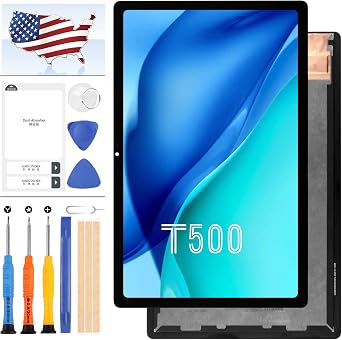
for Samsung Galaxy Tab A7 10.4 Screen Replacement T500 T505 LCD for Galaxy Tab A7 10.4 2020 SM-T500 SM-T505 LCD Display Touch Screen Digitizer
Item #:
87176497
TZS 85202
Price Details
Excluding Shipping & Custom charges ( Shipping and custom charges will be calculated on checkout )
*All items will import from US
0 ratings
Write a review
In stock
 Imported from USA store
QTY:
Order now and get it around Monday, July 27
Secured transaction
Ubuy works hard to protect your security and privacy. Our advanced payment security system ensures confidentiality by encrypting your information during transmission using AES (Advanced Encryption Standards) and SSL (Secure Socket Layer) protocols. Your payment details are 100% secure as we do not share your payment details with third party sellers.
Our Top Logistics Partners


Strict Quality Control - All products have passed strictly QC double tested and 100% in good condition before shipment. Make sure no scratch, no dead area, no dot pixel, or line in the screen. We refuse any flaw, provide A+ quality products only.

Fast
Shipping

Free
Return*

Secure Packaging

100% Original Products

PCI DSS Compliance

ISO 27001 Certified


Note: Step Down Voltage Transformer required for using electronics products of US store (110-120). Recommended power converters Buy Now.


What Stands Out
High-Quality Display
The Samsung Galaxy Tab A7 screen replacement offers vibrant colors and sharp images, ensuring a premium viewing experience that enhances your device's usability and satisfaction.
Complete Assembly Kit
This repair kit includes everything needed for a seamless replacement, allowing users to confidently fix their tablet without needing additional tools or components.
Compatibility Assurance
Designed specifically for the Galaxy Tab A7 10.4, this LCD replacement guarantees perfect fit and functionality for model numbers SM-T500 and SM-T505, minimizing installation hassles.
Product Details
| Item Weight | 0.7 lbs (320 grams) |
Who Should Buy?

-
DIY Enthusiasts
Ideal for users comfortable with self-repair projects, looking to replace their Galaxy Tab A7 screen.
-
Budget-Conscious Users
Great for those wanting to save on repair costs by replacing their device's screen themselves.
-
Tech Savvy Individuals
Perfect for experienced individuals who frequently work with electronic repairs, ensuring efficient screen replacements.

-
Casual Users
Not ideal for individuals who lack experience or knowledge in device repairs and may struggle with installation.
-
Time-Pressed Individuals
Unsuitable for those who do not have the time to invest in a DIY repair process.
-
Warranty Seekers
Users who want to maintain warranty coverage should avoid self-repair due to warranty voiding risks.
Product Description
for Samsung Galaxy Tab A7 10.4 Screen Replacement T500 T505 LCD for Galaxy Tab A7 10.4 2020 SM-T500 SM-T505 LCD Display Touch Screen Digitizer Assembly Repair Parts Kit with Free Tools (Black)
Have any Query? Chat with us
Customer Questions & Answers
-
Question:
What is included in the Samsung Galaxy Tab A7 10.4 Screen Replacement package?
Answer: The package for the Samsung Galaxy Tab A7 10.4 screen replacement includes the LCD display, a touch digitizer, and installation tools. This comprehensive kit prepares you for a complete replacement process, ensuring that you have everything needed to restore your device's functionality. Alongside the display, you may receive adhesive pads and a cleaning cloth, which can be extremely helpful in prepping and securing the new screen. This is particularly useful for anyone looking to undertake a DIY repair or for technicians who want to offer repair services efficiently. -
Question:
How can I install the Samsung Galaxy Tab A7 10.4 screen replacement?
Answer: To install the Samsung Galaxy Tab A7 10.4 screen replacement, start by powering off your tablet and removing the back cover carefully. Detach the old screen from the frame using tools provided in the package. Clean the surface, apply adhesive, and position the new LCD and digitizer into place. Reassemble your tablet and power it on to check functionality. This process allows users to save on repair costs as they can confidently handle the installation themselves or utilize professional services efficiently. -
Question:
Is the Samsung Galaxy Tab A7 10.4 screen replacement compatible with all models?
Answer: The Samsung Galaxy Tab A7 10.4 screen replacement is specifically designed for the T500 and T505 models (SM-T500, SM-T505). It is essential to confirm your model number before purchasing to ensure compatibility. Using an incompatible screen can lead to improper fit and functionality issues. Make sure you're ordering the correct product by checking the model number found on the back of your device or in the tablet settings, to ensure a smooth repair experience. -
Question:
What are common symptoms indicating that I need to replace my Galaxy Tab A7 screen?
Answer: Common symptoms that indicate a need for a screen replacement include a cracked or shattered glass surface, unresponsive touch areas, display flickering, or color distortion. If the screen is damaged physically or visually impaired, replacement is the best solution for restoring usability. Addressing these issues promptly ensures that you can continue using your Galaxy Tab A7 for tasks like browsing, streaming, and gaming without frustration. -
Question:
Can I use my Galaxy Tab A7 while the new screen is being installed?
Answer: No, you should not use your Galaxy Tab A7 while the screen is being installed. It is crucial to power off the device and safely remove the old screen to avoid damage to other internal components. Working with a powered-on device increases the risk of electrical hazards or inadvertently further damaging the tablet. A meticulous and cautious approach to installation ensures effective functionality after the replacement process. -
Question:
Are there any tools necessary for the installation of the screen replacement?
Answer: Yes, specific tools are required for the installation of the Samsung Galaxy Tab A7 screen replacement. These typically include a Phillips screwdriver, a plastic opening tool, and tweezers. Some screen replacement kits come with these essential tools included, which facilitate the disassembling and reassembling of your tablet. Having the right tools ensures that you do not damage your device and can perform a clean, professional-grade repair. -
Question:
Can I take my Galaxy Tab A7 for repair if I'm not comfortable doing it myself?
Answer: Absolutely! If you're not comfortable with DIY repairs, you can take your Galaxy Tab A7 to a professional repair service. They have the expertise and tools required to perform the replacement accurately. A professional can also provide additional services like device diagnostics to ensure there are no underlying issues. Opting for a professional repair is ideal if you want to guarantee a flawless installation without any risk of mishandling the device. -
Question:
How can I ensure the longevity of my new display after replacement?
Answer: To ensure the longevity of your new display after replacement, consider using a robust protective case and applying a screen protector. Regularly cleaning your tablet with suitable materials can also help maintain the screen's clarity and functionality. Being gentle while handling your device, specifically avoiding excess pressure on the display, will minimize the risk of future damage. These practices contribute to maintaining your tablet's performance and appearance over time. -
Question:
What if the new screen displays issues after installation?
Answer: If your new screen shows issues after installation, such as flickering or unresponsiveness, first ensure that all connections are secure. Sometimes, a loose connection can lead to display problems. If everything appears fine but issues persist, consult with the seller for support or consider professional evaluation. This troubleshooting step can lead to addressing potential misalignment or deeper issues that may require further inspection, ensuring your device works optimally. -
Question:
Where can I buy the Samsung Galaxy Tab A7 10.4 Screen Replacement?
Answer: You can purchase the Samsung Galaxy Tab A7 10.4 Screen Replacement from Ubuy in Tanzania. Ubuy is known for its extensive selection of electronic accessories, including quality replacement screens for various models. Their platform not only offers competitive pricing but also a convenient shopping experience. Browse the Ubuy website to find and order your replacement LCD and touch screen digitizer with ease.
A-MIND Screens Editorial Review
No editorial reviews found
Customer Reviews & Ratings
1 customers ratings
-
5 Star
100%
-
4 Star
0%
-
3 Star
0%
-
2 Star
0%
-
1 Star
0%
Review this product
Share your thoughts with other customers
Platform Trust & Buyer Confidence

MT
Mohd
Verified buyer
“The product received very good packaging & safe…Thank You”
16 June 2026 · via Trustpilot
SJ
Shawati
Verified buyer
“Accurate delivery timing given”
16 June 2026 · via Trustpilot
YB
Youcef
Verified buyer
“Not madly expensive like I thought, and much quicker than promised.”
15 June 2026 · via Trustpilot
LM
Leila
Verified buyer
“Never dealt with Ubuy before, but everything worked out great. Seamless cross border purchasing and shipping. Thanks!”
6/7/2026 · via Trustpilot
KA
Kwame
Verified buyer
“The process was smooth, with clear communication and timelines. This was my 1st purchase and I am really impressed. I will definitely be coming back.”
12 June 2026 · via Trustpilot
Secure Checkout
Global Delivery
Easy Returns
Genuine Products
Product Price History
Important information
- Limitations : For products shipped internationally, please note that any manufacturer warranty may not be valid; manufacturer service options may not be available; product manuals, instructions, and safety warnings may not be in destination country languages; the products (and accompanying materials) may not be designed in accordance with destination country standards, specifications, and labeling requirements; and the products may not conform to destination country voltage and other electrical standards (requiring use of an adapter or converter if appropriate). The recipient is responsible for assuring that the product can be lawfully imported to the destination country. When ordering from Ubuy or its affiliates, the recipient is the importer of record and must comply with all laws and regulations of the destination country.
- Not all the products listed on Ubuy are for sale, as Ubuy is a global search engine. Products are subject to export/trade regulations.
TZS 85202
Order now and get it around Monday, July 27
This item is not restrict in my country.(Please click on above link if this item is not restrict in your country, So our team will review and allow.)
QTY:
Secured transaction
Ubuy works hard to protect your security and privacy. Our advanced payment security system ensures confidentiality by encrypting your information during transmission using AES (Advanced Encryption Standards) and SSL (Secure Socket Layer) protocols. Your payment details are 100% secure as we do not share your payment details with third party sellers.
Our Top Logistics Partners
Fastest cross-border delivery
Features & Benefits
- High quality LCD display touch screen digitizer assembly kit
- Compatible with Samsung Galaxy Tab A7 10.4 (2020) SM-T500 SM-T505 T500 T505
- Package includes various tools for installation
- Before installation, test the product and ensure proper precautions against static electricity
- Screen replacement is fragile, simulate testing before full installation
- Strict quality control ensures flawless products