0 ratings





Item #:
20195512
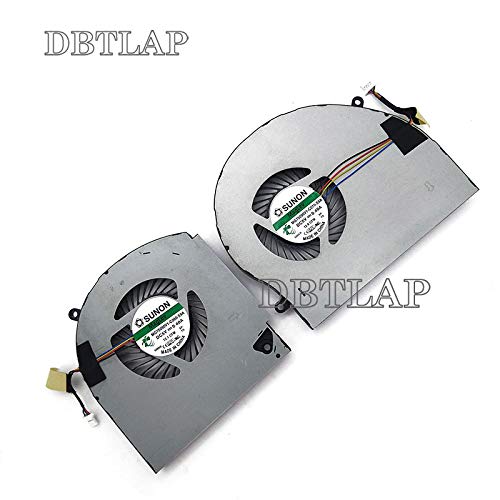
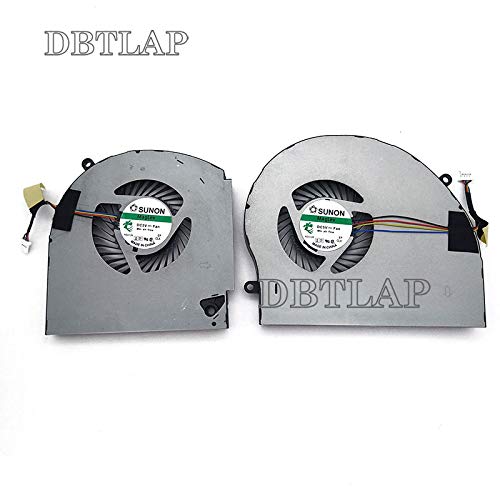
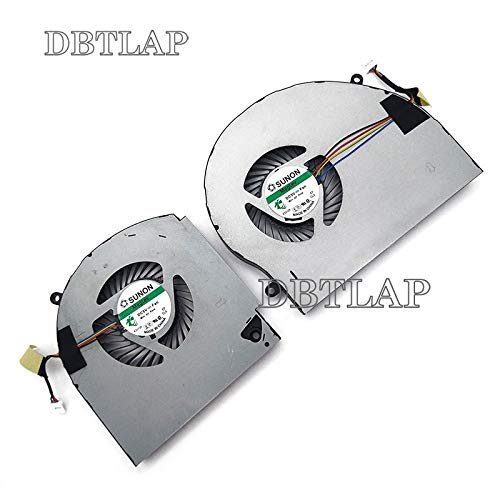
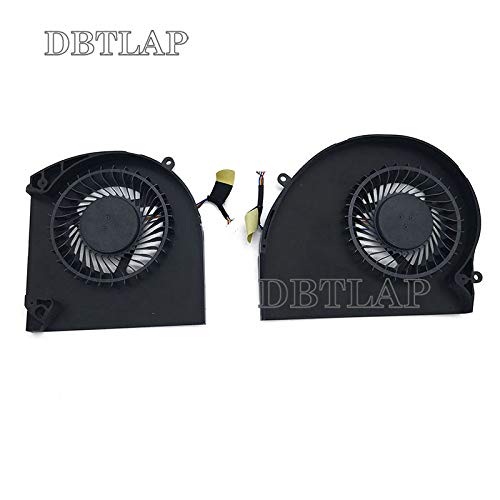
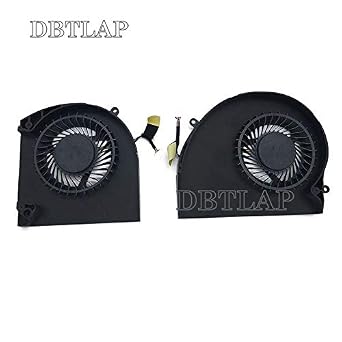
Fan Compatible for Dell for Alienware 17 R4 R5 ALW17C CPU + GPU Fan MG75090V1-C060-S9A MG75090V1-C070-S9A Cooling Fan
Item #:
20195512
TZS 163406
Price Details
Excluding Shipping & Custom charges ( Shipping and custom charges will be calculated on checkout )
*All items will import from US
0 ratings
Write a review
In stock
 Imported from USA store
QTY:
Order now and get it around Tuesday, August 04
Secured transaction
Ubuy works hard to protect your security and privacy. Our advanced payment security system ensures confidentiality by encrypting your information during transmission using AES (Advanced Encryption Standards) and SSL (Secure Socket Layer) protocols. Your payment details are 100% secure as we do not share your payment details with third party sellers.
Our Top Logistics Partners


Fast
Shipping

Free
Return*

Secure Packaging

100% Original Products

PCI DSS Compliance

ISO 27001 Certified


Note: Step Down Voltage Transformer required for using electronics products of US store (110-120). Recommended power converters Buy Now.


What Stands Out
High Compatibility
Designed specifically for Dell Alienware 17 R4 and R5 models, ensuring a perfect fit with MG75090V1-C060-S9A and MG75090V1-C070-S9A configurations to enhance cooling performance.
Optimal Cooling
Delivers efficient airflow to keep CPU and GPU temperatures low, significantly improving performance and lifespan of components during intense gaming or heavy applications.
Easy Installation
User-friendly design allows for quick and hassle-free installation, enabling users to upgrade their cooling system without technical expertise, saving time and ensuring consistent performance.
Product Details
- DBTLAP Fan Compatible for Dell Alienware 17 R4 R5 ALW17C CPU + GPU FAN MG75090V1-C060-S9A MG75090V1-C070-S9A cooling fan
- 【Quality Item】 Each item will be Tested it one by one before shipping ensure 100% work.
- 【Warm Tips】All pictures are taken in kind, please check carefully with your original fan before buying. If you can not sure whether it fit Compatible For your need, please contact with us before buy it to avoid choose wrong.
| Power Connector Type | 4-Pin |
| Voltage | 5 Volts |
| Wattage | 2 watts |
| Cooling Method | Air |
| Compatible Devices | Laptop |
| Maximum Rotational Speed | 2500 RPM |
| Material Type | Gpu |
| Brand Name | DBTLAP |
| Manufacturer | DBTLAP |
| Part Number | Dell ALW17C ファン |
| Unit Count | 1.0 Count |
| Brand | DBTLAP |
| Material | Gpu |
| Package Weight | 1.0 Pound |
Who Should Buy?

-
Gaming Enthusiasts
Gamers using Alienware 17 R4/R5 will benefit from effective cooling for consistent performance during intensive gaming sessions.
-
Frequent Upgraders
Users who upgrade their Alienware laptop components will need a reliable cooling fan to maintain optimal temperatures.
-
Heat-sensitive Tasks
Professionals running resource-heavy applications, such as video editing or 3D rendering, will require efficient cooling solutions.

-
Occasional Users
Casual users not pushing their laptops may not require an intensive cooling solution like this fan replacement.
-
Non-Alienware Models
This fan is specifically for Alienware 17, unsuitable for other laptop brands or models needing different specifications.
-
Budget-limited Buyers
Users looking for low-cost cooling solutions may find better value in alternative, less expensive fan options.
Product Description
Have any Query? Chat with us
Related Searches
Customer Questions & Answers
-
Question:
What is the purpose of the Fan Compatible for Dell for Alienware 17 R4 R5?
Answer: The Fan Compatible for Dell Alienware 17 R4 R5 serves as a critical cooling solution for your gaming laptop. It helps maintain optimal temperatures for both the CPU and GPU during demanding tasks like gaming or video editing, preventing overheating and ensuring consistent performance. A well-functioning cooling fan is essential in prolonging the lifespan of your hardware and providing a smooth user experience by minimizing thermal throttling. -
Question:
How do I know if I need to replace my cooling fan?
Answer: Signs that indicate a need for a cooling fan replacement include excessive noise, overheating of the laptop, or frequent system shutdowns during high-performance tasks. If your Alienware 17 feels significantly hotter than usual or the fan is making grinding sounds, it may become necessary to replace it to avoid permanent damage. Monitoring temperatures using software tools can also help in identifying cooling issues early. -
Question:
Are the MG75090V1-C060-S9A and MG75090V1-C070-S9A fans interchangeable?
Answer: Yes, the MG75090V1-C060-S9A and MG75090V1-C070-S9A fans are designed to be compatible and interchangeable for cooling solutions in the Alienware 17 R4 R5 models. Both fans meet the necessary specifications for efficient cooling, making it convenient for users looking to replace either fan without compatibility concerns. However, it's advisable to check your specific model’s documentation to ensure proper installation. -
Question:
Can I install the fan myself, or should I seek professional help?
Answer: While it is possible to install the fan yourself if you have basic technical skills, many users opt for professional assistance to avoid potential pitfalls. The installation process involves disassembling parts of the laptop, which can be intricate. If you're not confident in your ability to reinstall the components properly, seeking help from a technician ensures that the fan is installed securely and functions optimally, maintaining cooling efficiency. -
Question:
What should I check in my laptop before replacing the fan?
Answer: Before replacing the fan, ensure the laptop is powered off and unplugged. Also, check for any dust buildup on the existing fan and vents, as cleaning might resolve the overheating issue. Inspect cables and connectors for damage or wear, as these may affect fan performance. Knowing your Alienware model number and compatibility with the replacement fan is also crucial for ensuring a smooth replacement process. -
Question:
What tools do I need for installation of the cooling fan?
Answer: Typically, you will need a precision screwdriver set, particularly a Phillips head screwdriver, to remove the laptop casing. Anti-static wrist straps are recommended to avoid damaging internal components. Additionally, a plastic pry tool can help safely open the casing without causing damage. Having a clean workspace will make the installation process easier and prevent losing any small screws or parts during the installation. -
Question:
How does a cooling fan impact gaming performance?
Answer: A well-functioning cooling fan significantly impacts gaming performance by preventing thermal throttle, which occurs when the CPU or GPU overheats and reduces performance to manage temperature. With optimal cooling, components run at their best efficiency, allowing for higher frame rates and better graphics. Consistent cooling results in a more enjoyable gaming experience without interruptions caused by overheating issues. -
Question:
What are signs of a failing fan in the Alienware 17 R4 R5?
Answer: Common symptoms indicating a failing fan include consistent overheating, unusual noises such as rattling or grinding, and fan failure to spin up when needed. If your laptop frequently freezes or crashes under load, these may also reflect cooling failures. Observing these signs early and addressing them with a replacement can help maintain performance and hardware health over time. -
Question:
Where can I buy the Fan Compatible for Dell for Alienware 17 R4 R5?
Answer: You can buy the Fan Compatible for Dell for Alienware 17 R4 R5 on Ubuy. Ubuy offers a convenient and user-friendly shopping experience, featuring a vast selection of compatible cooling fans. Browse their website to see detailed product specifications and helpful customer reviews, ensuring you make an informed choice for your laptop's cooling needs.
DBTLAP CPU Cooling Fans Editorial Review
No editorial reviews found
Customer Reviews & Ratings
7 customers ratings
-
5 Star
52%
-
4 Star
16%
-
3 Star
17%
-
2 Star
0%
-
1 Star
15%
Review this product
Share your thoughts with other customers
Platform Trust & Buyer Confidence

MT
Mohd
Verified buyer
“The product received very good packaging & safe…Thank You”
16 June 2026 · via Trustpilot
SJ
Shawati
Verified buyer
“Accurate delivery timing given”
16 June 2026 · via Trustpilot
YB
Youcef
Verified buyer
“Not madly expensive like I thought, and much quicker than promised.”
15 June 2026 · via Trustpilot
LM
Leila
Verified buyer
“Never dealt with Ubuy before, but everything worked out great. Seamless cross border purchasing and shipping. Thanks!”
6/7/2026 · via Trustpilot
KA
Kwame
Verified buyer
“The process was smooth, with clear communication and timelines. This was my 1st purchase and I am really impressed. I will definitely be coming back.”
12 June 2026 · via Trustpilot
Secure Checkout
Global Delivery
Easy Returns
Genuine Products
Top selling Alienware cooling fan in UAE


Last Updated on June 27, 2026
Product Price History
Important information
- Limitations : For products shipped internationally, please note that any manufacturer warranty may not be valid; manufacturer service options may not be available; product manuals, instructions, and safety warnings may not be in destination country languages; the products (and accompanying materials) may not be designed in accordance with destination country standards, specifications, and labeling requirements; and the products may not conform to destination country voltage and other electrical standards (requiring use of an adapter or converter if appropriate). The recipient is responsible for assuring that the product can be lawfully imported to the destination country. When ordering from Ubuy or its affiliates, the recipient is the importer of record and must comply with all laws and regulations of the destination country.
- Not all the products listed on Ubuy are for sale, as Ubuy is a global search engine. Products are subject to export/trade regulations.
TZS 163406
Order now and get it around Tuesday, August 04
This item is not restrict in my country.(Please click on above link if this item is not restrict in your country, So our team will review and allow.)
QTY:
Secured transaction
PCI DSS compliant and ISO 27001:2022 certified, with encrypted payments and full buyer protection on every order.
Our Top Logistics Partners
Fastest cross-border delivery
Ubuy Assurance
Experience worry-free shopping with 100% original products, PCI DSS-compliant payment security, ISO 27001-certified data protection, the fastest cross-border delivery, free returns *, and secure packaging on every order.