- Home Page /
- Office Electronics /
- Printers & Accessories /
- Printer Parts & Accessories /
- Printer Transfer Belts, Rollers & Units /
- Printer Transfer Rollers /
- CF081-67905-MK-AP (CD644-67906, CE484A) Delux...
0 ratings

Item #:
18482712
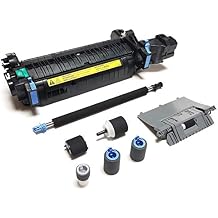
CF081-67905-MK-AP (CD644-67906, CE484A) Deluxe Maintenance Kit for Color Laser Printer M551 (110V) Includes Fuser (RM1-4955, RM1-8154), Transfer
Item #:
18482712
TZS 469934
Price Details
Excluding Shipping & Custom charges ( Shipping and custom charges will be calculated on checkout )
*All items will import from US
0 ratings
Write a review
In stock
 Imported from USA store
QTY:
Order now and get it around Thursday, July 23
Secured transaction
Ubuy works hard to protect your security and privacy. Our advanced payment security system ensures confidentiality by encrypting your information during transmission using AES (Advanced Encryption Standards) and SSL (Secure Socket Layer) protocols. Your payment details are 100% secure as we do not share your payment details with third party sellers.
Our Top Logistics Partners


Altru Print Deluxe Maintenance Kit ensures optimum printer performance.

Fast
Shipping

Free
Return*

Secure Packaging

100% Original Products

PCI DSS Compliance

ISO 27001 Certified


Note: Step Down Voltage Transformer required for using electronics products of US store (110-120). Recommended power converters Buy Now.


What Stands Out
Complete Maintenance Solution
This deluxe maintenance kit includes fuser, transfer roller, and tray rollers, ensuring your printer operates smoothly and efficiently, reducing potential downtime.
Enhanced Print Quality
Upgrade your printer’s performance with replacement components that restore vibrant color output, ensuring every printed document meets professional standards.
Easy Installation
Designed for user-friendly setup, this kit allows for quick installation, making it accessible even for users with minimal technical experience.
Product Details
- Compatible with HP Part #'s; CE484A, RM1-4955, RM1-8154, CC519-67901, CC519-67919, CF081-67905, CD644-67906, CC468-67924, CC468-67911, CD644-67904, CF081-67913
- Supports HP Color LaserJet M551
- Includes 1 x CF081-67905 (CE484A, RM1-4955) Fuser, 1x RM1-8176 Secondary Transfer Roller, 1 x RL1-2184 Tray 1 Pickup Roller, 1 x RM1-8129 Tray 2 Separation Roller Assembly, 1 x RM1-8131 Tray 2 Pickup Roller, 2 x RM1-0037 Tray 3 Feed / Separation Rollers, 1 x RL1-2099 Tray 3 Pickup Roller, Gloves, Instructions, Prepaid Free Core Return Shipping Label
- High quality components and printer maintenance experts ensure optimum printer performance
- Includes (1) CE484A Altru Print Fuser, (1) RM1-8176 Secondary Transfer Roller, (1) RL1-2184 Tray 1 Pickup Roller, (1) RM1-8129 Tray 2 Separation Roller Assembly, (1) RM1-8131 Tray 2 Pickup Roller, (2) RM1-0037 Tray 3 Feed / Separation Rollers, (1) RL1-2099 Tray 3 Pickup Roller, (1) Pair of Gloves, (1) Installation Instructions, (1) Prepaid Free Core Return Shipping Label
- 6-month warranty and industry experienced customer support
- Manufactured with high quality components and 100% guaranteed to produce optimum print quality
| Item Weight | 5 lbs (2.27 kg) |
Who Should Buy?

-
Frequent Printer Users
Ideal for businesses or individuals who regularly print high volumes of documents requiring dependable maintenance and performance.
-
Color Printing Needs
Great for users needing vibrant color prints, ensuring quality through regular maintenance with the necessary components included.
-
Cost-Conscious Maintenance
Perfect for organizations wanting to reduce long-term printing costs by investing in a comprehensive maintenance solution.

-
Occasional Users
Unsuitable for users who print infrequently and may not require extensive maintenance kits or the cost associated.
-
Non-Professional Settings
Not ideal for home environments where simple, economical inkjet printers would meet basic printing needs effectively.
-
Older Printer Models
Incompatible with outdated printers that do not support the specific parts included in this deluxe maintenance kit.
Product Description
CF081-67905-MK-AP (CD644-67906, CE484A) Deluxe Maintenance Kit for Color Laser Printer M551 (110V) Includes Fuser (RM1-4955, RM1-8154), Transfer Roller & Tray 1-3 Rollers (CF081-67903)
Have any Query? Chat with us
Customer Questions & Answers
-
Question:
What is included in the Altru Print CE484A Deluxe Maintenance Kit?
Answer: The Altru Print CE484A Deluxe Maintenance Kit includes essential components for maintaining your Color Laser Printer M551. Specifically, this kit comprises a fuser unit (RM1-4955), a transfer roller (RM1-8154), and other necessary maintenance parts. These components are designed to keep your printer operating smoothly, ensuring high-quality prints and optimal performance. By regularly replacing these parts, you'll avoid print quality issues such as streaks or faded colors, thereby extending the printer's lifespan. -
Question:
Is the maintenance kit compatible with other printer models?
Answer: The Altru Print CE484A Deluxe Maintenance Kit is specifically designed for the Color Laser Printer M551. Thus, it may not be compatible with other printer models. Ensuring compatibility is crucial for effective maintenance; using parts that are not designed for your specific model may lead to installation issues or suboptimal performance. For best results, always verify the compatibility of maintenance kits with your printer model to avoid operational hiccups. -
Question:
How does the fuser in the maintenance kit work?
Answer: The fuser in the Altru Print CE484A Deluxe Maintenance Kit is a crucial component responsible for bonding toner to paper. It uses heat and pressure to melt the toner particles, ensuring that they adhere properly to the printed page. Over time, the fuser can wear out or become less effective, leading to poor print quality. Replacing the fuser as part of routine maintenance helps prevent issues like smudging or faded prints, contributing to crisp, professional-looking documents. -
Question:
When should I replace the parts in the maintenance kit?
Answer: It's advisable to replace the components in the Altru Print CE484A Deluxe Maintenance Kit every 20,000 to 30,000 pages, depending on your print volume. You'll notice signs such as inconsistent print quality, streaks, or fading as indicators that maintenance is needed. By keeping track of your printing, you can schedule timely replacements, ensuring optimal printer performance and print quality while avoiding unexpected downtime and providing uninterrupted service. -
Question:
What are the benefits of using a maintenance kit?
Answer: Using a maintenance kit, like the Altru Print CE484A Deluxe Maintenance Kit, helps maintain optimal printer performance and prolongs the printer's life. By replacing worn components such as the fuser and transfer roller, you ensure consistent print quality and reliability. Additionally, regular maintenance can prevent costly repairs by addressing minor issues before they escalate. This proactive approach makes it an essential investment for businesses and individuals who rely on dependable printing. -
Question:
How do I install the components from the maintenance kit?
Answer: Installing the components from the Altru Print CE484A Deluxe Maintenance Kit is straightforward. Start by turning off the printer and unplugging it. Open the printer cover and carefully remove the old fuser and transfer roller according to the manufacturer's instructions. Then, insert the new components from the maintenance kit, ensuring they are securely positioned. Finally, close the printer and run a test print to check that everything is functioning correctly. Following the installation guide ensures a seamless process and optimal performance. -
Question:
Can I get help if I encounter issues with installation?
Answer: If you encounter issues with the installation of the Altru Print CE484A Deluxe Maintenance Kit, various resources are available to assist you. Manufacturer websites often provide detailed installation guides and troubleshooting tips. Additionally, online forums and customer support can offer advice and solutions based on real-user experiences. Engaging with these resources can help resolve concerns and ensure that your printer is performing at its best after the maintenance kit installation. -
Question:
Where can I buy the Altru Print CE484A Deluxe Maintenance Kit?
Answer: You can purchase the Altru Print CE484A Deluxe Maintenance Kit on Ubuy in Tanzania. Ubuy is a reliable e-commerce platform offering a wide range of printer maintenance products, ensuring you have access to the latest components. Shopping on Ubuy allows you to browse customer reviews and product details, making it easier for you to make informed decisions for your printer maintenance needs. -
Question:
Does using third-party maintenance kits affect my printer's performance?
Answer: Using third-party maintenance kits can sometimes lead to varying performance compared to manufacturer-recommended options like the Altru Print CE484A Deluxe Maintenance Kit. While third-party kits may be more affordable, they often do not guarantee the same quality standards, potentially leading to installation challenges or performance issues. For optimal results, consider sticking to reputable brands that are specifically designed for your printer model. -
Question:
What maintenance practices should I follow to ensure longevity of the printer?
Answer: To ensure the longevity of your Color Laser Printer M551, regular maintenance is key. This includes implementing a routine of cleaning the printer's interior, verifying that all components are working efficiently, and using the Altru Print CE484A Deluxe Maintenance Kit at recommended intervals. Additionally, keep the printer in a dust-free environment, and avoid overfilling the paper tray to reduce wear on the internal components. Such practices will ultimately save you time and costs in repairs.
Altru Print Printer Transfer Rollers Editorial Review
No editorial reviews found
Customer Reviews & Ratings
1 customers ratings
-
5 Star
100%
-
4 Star
0%
-
3 Star
0%
-
2 Star
0%
-
1 Star
0%
Review this product
Share your thoughts with other customers
Platform Trust & Buyer Confidence

MT
Mohd
Verified buyer
“The product received very good packaging & safe…Thank You”
16 June 2026 · via Trustpilot
SJ
Shawati
Verified buyer
“Accurate delivery timing given”
16 June 2026 · via Trustpilot
YB
Youcef
Verified buyer
“Not madly expensive like I thought, and much quicker than promised.”
15 June 2026 · via Trustpilot
LM
Leila
Verified buyer
“Never dealt with Ubuy before, but everything worked out great. Seamless cross border purchasing and shipping. Thanks!”
6/7/2026 · via Trustpilot
KA
Kwame
Verified buyer
“The process was smooth, with clear communication and timelines. This was my 1st purchase and I am really impressed. I will definitely be coming back.”
12 June 2026 · via Trustpilot
Secure Checkout
Global Delivery
Easy Returns
Genuine Products
Product Price History
Important information
- Limitations : For products shipped internationally, please note that any manufacturer warranty may not be valid; manufacturer service options may not be available; product manuals, instructions, and safety warnings may not be in destination country languages; the products (and accompanying materials) may not be designed in accordance with destination country standards, specifications, and labeling requirements; and the products may not conform to destination country voltage and other electrical standards (requiring use of an adapter or converter if appropriate). The recipient is responsible for assuring that the product can be lawfully imported to the destination country. When ordering from Ubuy or its affiliates, the recipient is the importer of record and must comply with all laws and regulations of the destination country.
- Not all the products listed on Ubuy are for sale, as Ubuy is a global search engine. Products are subject to export/trade regulations.
TZS 469934
Order now and get it around Thursday, July 23
This item is not restrict in my country.(Please click on above link if this item is not restrict in your country, So our team will review and allow.)
QTY:
Secured transaction
PCI DSS compliant and ISO 27001:2022 certified, with encrypted payments and full buyer protection on every order.
Our Top Logistics Partners
Fastest cross-border delivery
Features & Benefits
- High quality components for optimum print quality
- 6-month warranty included
- Experienced customer support team available
- Compatible with various HP printer models
- Includes all necessary components for maintenance
- Prepaid free core return shipping label included
Ubuy Assurance
Experience worry-free shopping with 100% original products, PCI DSS-compliant payment security, ISO 27001-certified data protection, the fastest cross-border delivery, free returns *, and secure packaging on every order.