0 ratings






Item #:
8190601
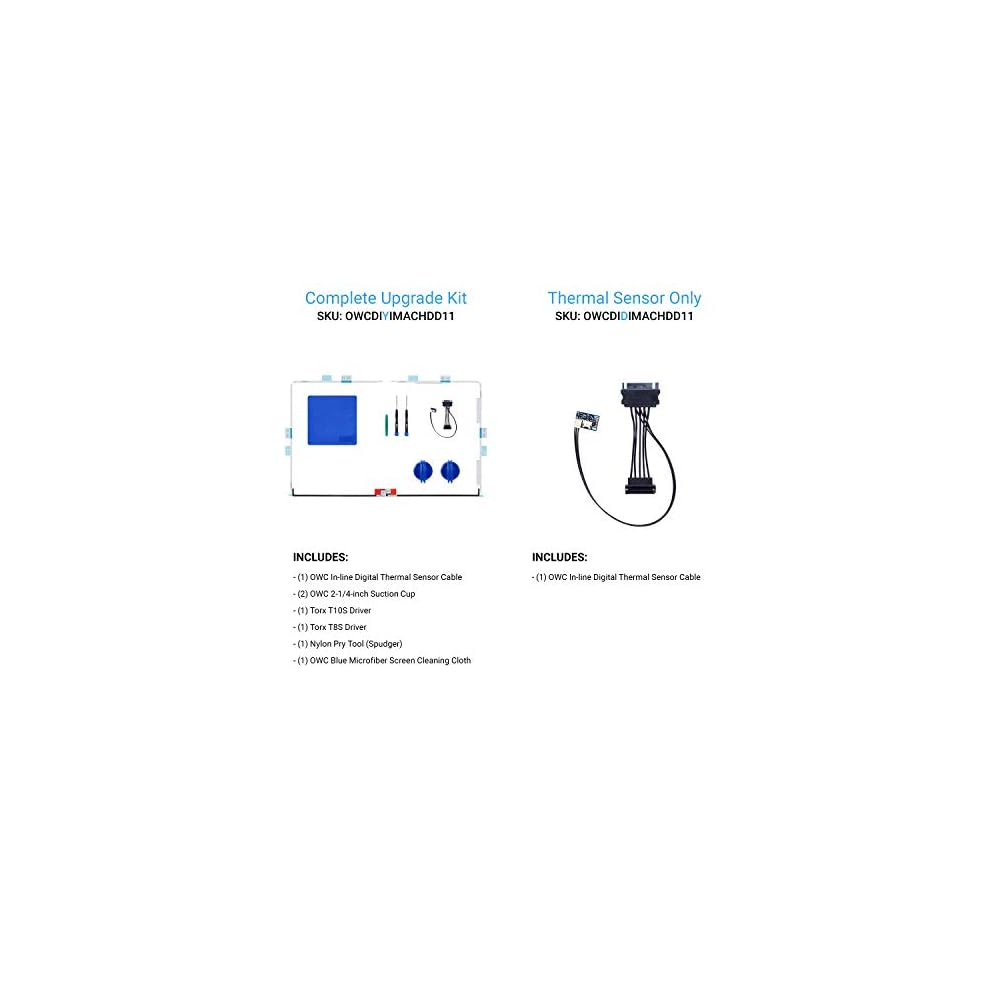
OWC in-Line Digital Thermal Sensor HDD Upgrade Cable for iMac 2011, (OWCDIDIMACHDD11)
Item #:
8190601
TZS 140107
Price Details
Excluding Shipping & Custom charges ( Shipping and custom charges will be calculated on checkout )
*All items will import from US
In stock
 Imported from USA store
QTY:
Only 7 items left in stock.
Order now and get it around Thursday, June 25
Secured transaction
Ubuy works hard to protect your security and privacy. Our advanced payment security system ensures confidentiality by encrypting your information during transmission using AES (Advanced Encryption Standards) and SSL (Secure Socket Layer) protocols. Your payment details are 100% secure as we do not share your payment details with third party sellers.
Our Top Logistics Partners


Upgrade your iMac with any SATA drive, No Software hacks, AHT Diagnostic compatible

Fast
Shipping

Free
Return*

Secure Packaging

100% Original Products

PCI DSS Compliance

ISO 27001 Certified


Note: Step Down Voltage Transformer required for using electronics products of US store (110-120). Recommended power converters Buy Now.


What Stands Out
Enhanced Thermal Management
This cable integrates seamlessly with your iMac's system, enabling optimal temperature control for hard drives, preventing overheating and extending their lifespan.
Plug-and-Play Design
Offering easy installation, this upgrade cable allows users to replace HDDs effortlessly without requiring advanced technical skills, making it accessible for all iMac 2011 owners.
Compatibility Assurance
Specifically designed for the iMac 2011 model, this cable ensures perfect fit and function, eliminating common compatibility issues faced with generic alternatives, thus providing reliable performance.
Product Details
- Includes cables necessary for drive installation into main drive bay of Apple iMac 2011 Models
- This item does not include installation tools; hard drive and tools sold separately
- Upgrade your iMac with any SATA drive, no Software hacks, AHT Diagnostic compatible
- Compatibility: 2011 iMac 21.5 inch (Model ID: iMac12,1); 2011 iMac 27 inch (Model ID: iMac12,2)
| Connector Type | Sata |
| Cable Type | SATA |
| Compatible Devices | 2011 27 iMac12,2), 2011 iMac 21.5 inch (Model ID: iMac12,1) |
| Other Special Features of the Product | High Speed |
| Connector Gender | Male-to-Male |
| Data Transfer Rate | 6 Megabits Per Second |
| Number of Pins | 7 |
| Connectivity Technology | SATA |
| Recommended Uses For Product | hard drive upgrade for iMac 2011 models for the purpose of maintaining correct system fan control and eliminating fan noise |
| Indoor Outdoor Usage | Indoor |
| Unit Count | 1.0 Count |
| Item Weight | 10 Grams |
| Number of Items | 1 |
| Brand Name | OWC |
| Model Name | OWCDIDIMACHDD11 |
| Model | OWCDIDIMACHDD11 |
| Manufacturer | Other World Computing |
| UPC | 794504333350 |
| Global Trade Identification Number | 00794504333350 |
| Part Number | FBA_OWCDIDIMACHDD11 |
| External Testing Certification | Não aplicável |
| Color | Black |
| Item Shape | Round |
| Brand | OWC |
| Special Feature | High Speed |
Who Should Buy?

-
DIY Computer Users
Ideal for users comfortable with opening their iMac to upgrade or replace the hard drive seamlessly.
-
iMac 2011 Owners
Specifically designed for iMac 2011 owners looking to enhance performance by replacing insufficient HDDs with SSDs.
-
Tech Enthusiasts
Great for tech enthusiasts who value optimized cooling solutions and want to maintain system temperature during upgrades.

-
Non-technical Users
Not suitable for users unfamiliar with computer hardware or hesitant to open their devices for upgrades.
-
Budget-Conscious Buyers
May not be the best choice for users looking for low-cost solutions without any performance considerations.
-
Users of Other Models
Incompatible with iMac models other than 2011; users with different models should seek appropriate alternatives.
Product Description
Have any Query? Chat with us
Customer Questions & Answers
-
Question:
What is the purpose of the OWC in-Line Digital Thermal Sensor HDD Upgrade Cable?
Answer: The OWC in-Line Digital Thermal Sensor HDD Upgrade Cable is designed to provide temperature monitoring for hard drives installed in iMac models from 2011. This is crucial because it ensures the internal fan operates correctly based on the temperature readings of the HDD, preventing overheating. Using this cable allows you to upgrade your iMac with a new hard drive while maintaining optimal performance and preventing potential damage from overheating, thus extending the lifespan of your equipment. -
Question:
Is the OWC in-Line Digital Thermal Sensor compatible with all iMac models?
Answer: No, the OWC in-Line Digital Thermal Sensor HDD Upgrade Cable is specifically compatible with the iMac models from 2011 that utilize a hard drive. It is essential to verify your iMac model before purchasing to ensure compatibility. Using this upgrade cable on an unsupported model may result in ineffective temperature readings and can lead to hardware issues. Always refer to the manufacturer's compatibility list for the most accurate information. -
Question:
How does the installation of this upgrade cable affect my iMac's performance?
Answer: Installing the OWC in-Line Digital Thermal Sensor HDD Upgrade Cable can significantly improve your iMac's performance by ensuring that your new HDD operates at the appropriate temperature. This prevents overheating and enables cooler operation, which enhances the overall performance of your iMac. For example, if you're using your iMac for intensive tasks like video editing or gaming, maintaining optimal thermal conditions is crucial for sustained performance. -
Question:
What types of hard drives can I use with this upgrade cable?
Answer: The OWC in-Line Digital Thermal Sensor HDD Upgrade Cable is designed to work with standard SATA hard drives and solid-state drives (SSDs). Therefore, you'll have the flexibility to choose from a wide range of storage options to fit your needs. This versatility allows you to customize your iMac with a drive that meets your storage requirements, whether it’s for general use, professional applications, or gaming. -
Question:
Will I need additional tools for installation?
Answer: Yes, you will likely need a few basic tools, such as a screwdriver, to install the OWC in-Line Digital Thermal Sensor HDD Upgrade Cable along with your new hard drive. It's essential to have tools on hand as installation may require opening your iMac. Following the included instructions carefully will help ensure that the installation is successful, and you can enjoy the benefits of upgraded storage and temperature monitoring. -
Question:
Can I use this upgrade cable if I already installed a third-party hard drive?
Answer: Yes, you can use the OWC in-Line Digital Thermal Sensor HDD Upgrade Cable with a third-party hard drive as long as it is compatible with your iMac 2011 model. This upgrade cable is designed to function with any compatible SATA drive, allowing you to enhance your iMac’s performance while maintaining accurate temperature readings. This is particularly useful if you intend to upgrade or replace a hard drive that is not functioning efficiently. -
Question:
What are the benefits of using a digital thermal sensor cable versus a traditional setup?
Answer: Using the OWC in-Line Digital Thermal Sensor HDD Upgrade Cable provides precise temperature readings that enhance the control of your iMac's cooling system. Unlike traditional setups, this cable ensures that the internal fan can respond dynamically to changes in HDD temperature, helping maintain cooler operation under heavy loads. This is especially beneficial in tasks like gaming or video editing, where higher temperatures can significantly impact performance and longevity of your components. -
Question:
How do I confirm if my iMac requires a thermal sensor upgrade?
Answer: To confirm if your iMac requires the OWC in-Line Digital Thermal Sensor HDD Upgrade Cable, check for any symptoms of overheating or fan speed issues after an HDD upgrade. Additionally, a quick inspection of your iMac's model number and year can clarify whether you are using a model that requires this specific upgrade for optimal operation. Always consult Apple's support documentation or community forums for detailed compatibility insights. -
Question:
What should I do if I encounter issues after installation?
Answer: If you encounter issues after installing the OWC in-Line Digital Thermal Sensor HDD Upgrade Cable, first ensure that all connections are secure and correctly positioned. Restart your iMac to check if the thermal sensor is functioning as expected. If problems persist, consulting with professionals or reaching out to OWC support can provide further assistance. Many users find that troubleshooting common installation mistakes resolves issues quickly. -
Question:
Where can I buy OWC in-Line Digital Thermal Sensor HDD Upgrade Cable for iMac 2011, OWCDIDIMACHDD11?
Answer: You can purchase the OWC in-Line Digital Thermal Sensor HDD Upgrade Cable for your iMac 2011 at Ubuy. Ubuy offers a straightforward shopping experience where you can receive the item straight to your address. By visiting Ubuy, you can explore other OWC products and discover various options that cater to your tech needs. Make sure to check the product specifications on Ubuy to ensure compatibility with your device.
OWC Internal Hard Drives Editorial Review


The OWC In-line Digital Thermal Sensor is designed for the 2011 iMac (model ID 12,1 and 12,2) allowing users to upgrade their hard drive to the SSD After replacing the hard drive with an SSD, the lack of temperature sensor would result in the fans running at 100% all of the time, this is resolved with the OWC In-line Digital Thermal Sensor. One customer experienced a sensor error and was advised to google for a solution to the error message, no installation issues or any mention of the manufacturing quality of the product in terms of working properly. This item made it possible to replace the hard drive in my mid-2011 21.5" iMac. No more noisy fans and hard drive sensor errors.
Customer Reviews & Ratings
1167 customers ratings
-
5 Star
80%
-
4 Star
9%
-
3 Star
4%
-
2 Star
2%
-
1 Star
5%
Review this product
Share your thoughts with other customers
Pros
- Resolves issues with fan noise after replacing a hard drive to an SSD in a 2011 iMac
- Designed for the 2011 iMac model, making the upgrade to SSD hassle-free
- Simple to setup
Cons
- Pricey
Product Price History
Important information
- Limitations : For products shipped internationally, please note that any manufacturer warranty may not be valid; manufacturer service options may not be available; product manuals, instructions, and safety warnings may not be in destination country languages; the products (and accompanying materials) may not be designed in accordance with destination country standards, specifications, and labeling requirements; and the products may not conform to destination country voltage and other electrical standards (requiring use of an adapter or converter if appropriate). The recipient is responsible for assuring that the product can be lawfully imported to the destination country. When ordering from Ubuy or its affiliates, the recipient is the importer of record and must comply with all laws and regulations of the destination country.
- Not all the products listed on Ubuy are for sale, as Ubuy is a global search engine. Products are subject to export/trade regulations.
TZS 140107
Order now and get it around Thursday, June 25
This item is not restrict in my country.(Please click on above link if this item is not restrict in your country, So our team will review and allow.)
QTY:
Only 7 items left in stock.
Secured transaction
Ubuy works hard to protect your security and privacy. Our advanced payment security system ensures confidentiality by encrypting your information during transmission using AES (Advanced Encryption Standards) and SSL (Secure Socket Layer) protocols. Your payment details are 100% secure as we do not share your payment details with third party sellers.
Our Top Logistics Partners
Fastest cross-border delivery
Features & Benefits
- Includes all cables and tools necessary for drive installation into main drive bay of Apple iMac 2011 Models
- Compatibility with 2011 iMac 21.5 inch (Model ID: iMac12,1) and 2011 iMac 27 inch (Model ID: iMac12,2)
- OWC In-line Digital Thermal Sensor Cable included to monitor drive temperature
- 2 suction cups included for the outer glass removal
- OWC Torx T8S Driver, OWC Torx T10S Driver, and NewerTech Pry Tool included for easy installation
- OWC Microfiber Pro Cleaning Cloth included for cleaning the screen and surrounding area